<?xml version="1.0" encoding="utf-8"?>
<feed xmlns="http://www.w3.org/2005/Atom">
	<title>Vague, but exciting…</title>
	<subtitle>Engineering write-ups from 18 months of building an iOS/wearable sensor product — verified fixes, agent workflows, and the failures that wrote the runbook.</subtitle>
	<link href="https://vaguebutexciting.dev/feed.xml" rel="self"/>
	<link href="https://vaguebutexciting.dev/"/>
	<updated>2026-09-10T00:00:00.000Z</updated>
	<id>https://vaguebutexciting.dev/</id>
	<author><name>Colin Rooney</name></author>
	<entry>
		<title>My robot drove itself down a trail. Then it met a corner.</title>
		<link href="https://vaguebutexciting.dev/posts/robot-drove-itself-then-a-corner-log2/"/>
		<id>https://vaguebutexciting.dev/posts/robot-drove-itself-then-a-corner-log2/</id>
		<updated>2026-09-10T00:00:00.000Z</updated>
		<summary>Straights: solved. Tested five times on a straight section, 94–100 % of the time on the trail. Corners: it runs wide every time, and two field days of tuning couldn&#39;t fix it. Here&#39;s everything that happened since the kitchen — and why the next step is a racetrack on my kitchen floor.</summary>
		<content type="html"><![CDATA[<p><em>Straights: solved. Tested five times on a straight section, 94–100 % of the time on the trail. Corners: it runs wide every time, and two field days of tuning couldn't fix it. Here's everything that happened since the kitchen — and why the next step is a racetrack on my kitchen floor.</em></p>
<p>Last time, this was a phone in my hand, walking a kitchen. This time the phone is bolted to an RC
truck (the same one that was an obstacle in the kitchen video), and the truck drives itself.
I call it the Robo Bump Truck.</p>
<p>Nothing about the method changed. That's the point of this log.</p>
<figure>
<img src="/assets/robo-log2/trail-photo-strip.png" alt="Figure 1. The truck on the trail, from three cameras, plus what the robot sees and what the model draws.">
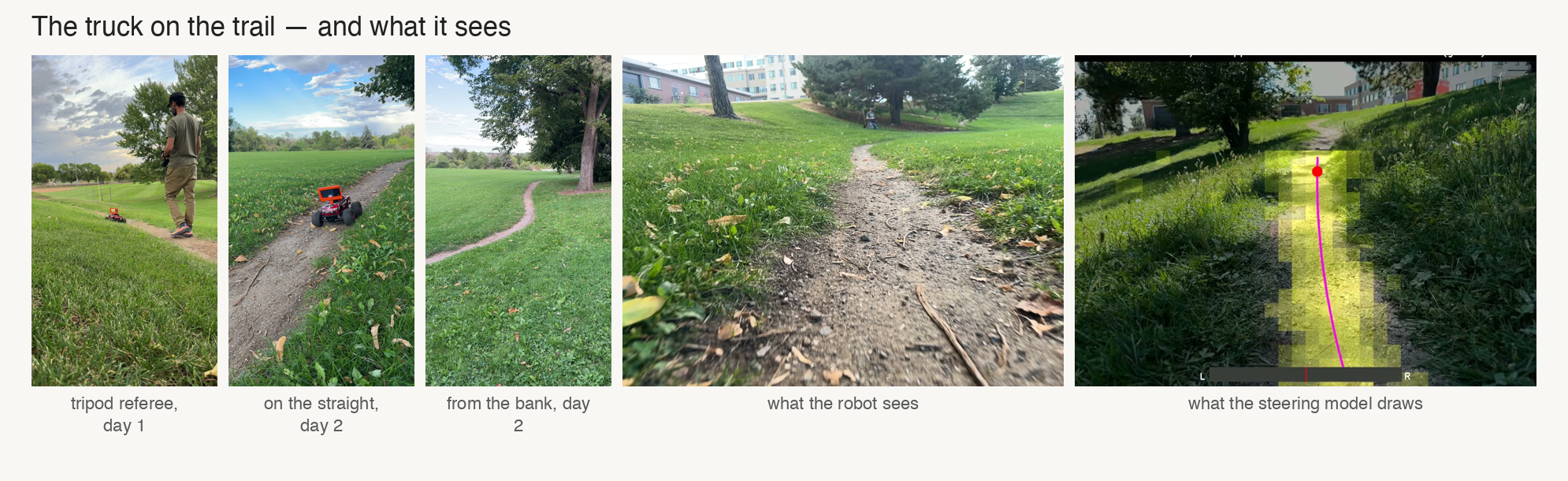
<figcaption><span class="figno">Figure 1.</span> Left to right: the tripod referee on day 1; on the straight and from the bank on day 2; the robot's own view; and the steering model's output on that view: yellow patches score high for "trail", the magenta line is the fitted centre, the dot is the goal point.</figcaption>
</figure>
<h2>1 · What changed on the truck</h2>
<p>It now carries a Jetson Orin Nano in a printed cradle, a Pixhawk flight controller running
ArduRover, a RadioMaster MT12 transmitter talking to an ExpressLRS receiver, and an iPhone on a
wedge mount looking down the trail. The phone's video camera is the only thing the model sees, and
it's all the model uses to drive.</p>
<h2>2 · Training: two models, no hand-drawn labels</h2>
<p>The whole project rests on one idea: <strong>expensive sensors teach, cheap sensors ship.</strong> The phone
carries LiDAR, motion tracking and an accelerometer. All of it is used to <em>label</em> the
training images automatically. None of it is used to drive. The field calls this
<strong>self-supervised</strong> learning, in a specific sense: the robot's own other sensors write the labels,
and no human does. The training step itself is ordinary supervised learning against that answer
key — the word &quot;self&quot; refers to who wrote the labels, not to how the model learns. The point of it,
beyond the shipping argument, is time: every hour the sensors spend labelling is an hour a human
doesn't. There are two models, and each has a different teacher. If you want to dig deeper, the
obstacle model is in the lineage of Berkeley's BADGR, which labels images from the robot's own
collision and bumpiness sensors; the steering model is in the lineage of ETH's Wild Visual
Navigation, which labels images from the path the robot actually traversed.</p>
<h3>2.1 · The obstacle model (DangerNet) — taught by bumps</h3>
<p>This is Log #1's method. I walk up to each obstacle, and at arm's length I bump the
phone body with my free hand — the phone never touches the obstacle. The accelerometer marks the
moment; the LiDAR marks where the obstacle is; and that spot is projected back into every frame of
the approach as &quot;no-go.&quot; The floor I walk over in the next few seconds is projected back into those
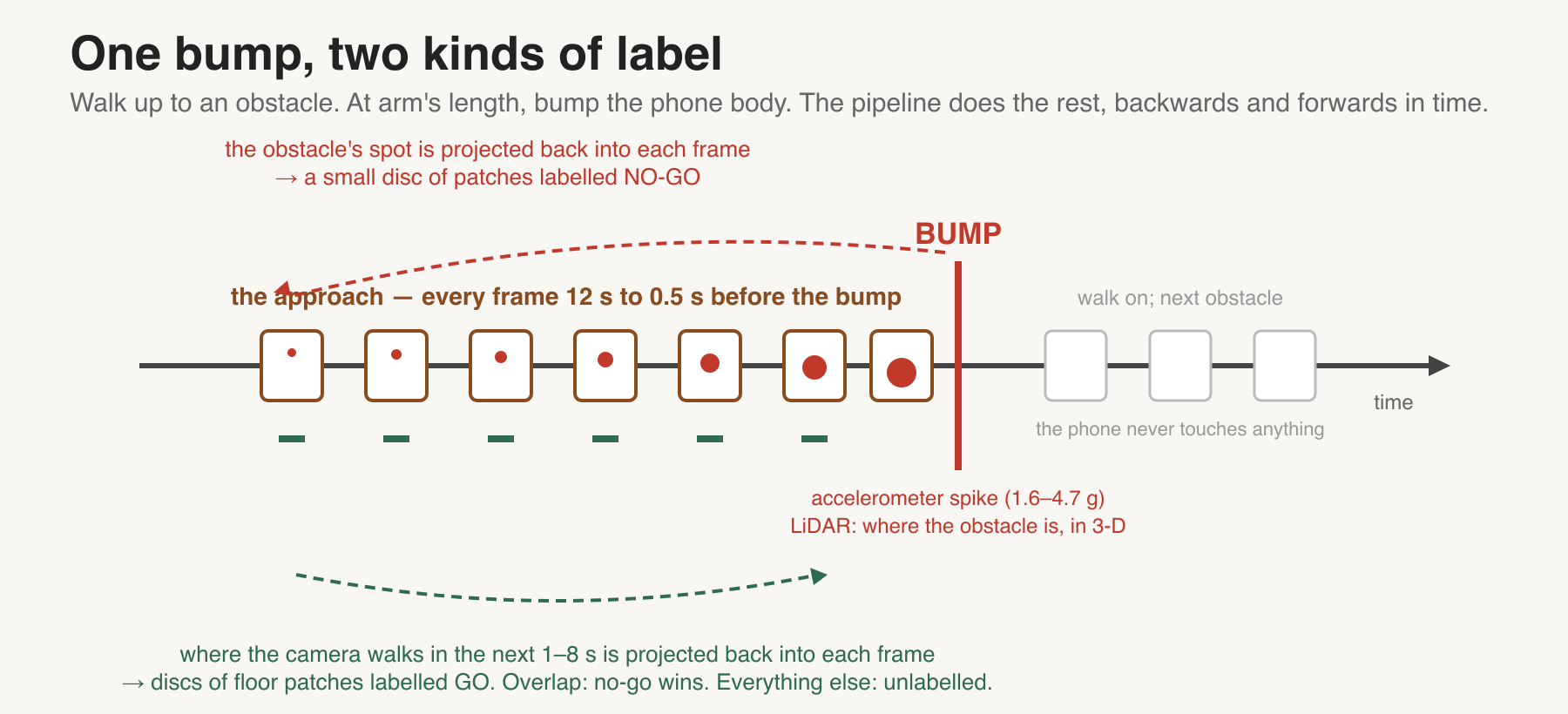
same frames as &quot;go&quot; (Figure 2). Thirty bumps became 147,731 labelled image patches.</p>
<figure>
<img src="/assets/robo-log2/bump-method-timeline.png" alt="Figure 2. One bump, two kinds of label.">
<figcaption><span class="figno">Figure 2.</span> One bump, two kinds of label. The obstacle's location is projected back into the 12 seconds of approach frames as no-go; the floor the camera walks over in the next 1–8 seconds is projected back as go. Where they overlap, no-go wins.</figcaption>
</figure>
<h3>2.2 · The steering model — taught by where the truck went</h3>
<p>The model that drove the truck has a different teacher: the truck's own path. I drive a lap by
hand while the phone records video and its motion-tracking pose. Afterwards, the path the truck
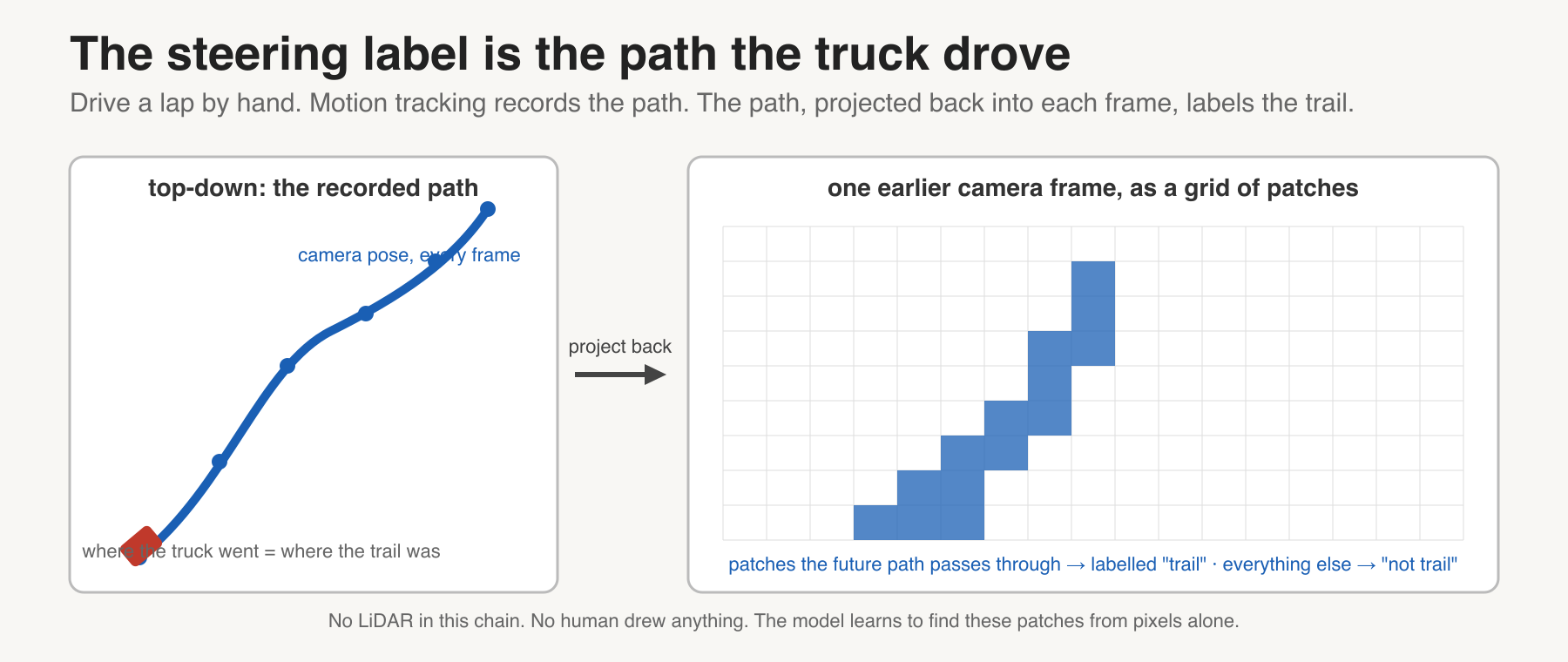
actually took is projected back into every frame, and the image patches that path passes through
are labelled &quot;trail&quot; (Figure 3). No LiDAR in this chain at all, and no human drew a line to teach
it.</p>
<figure>
<img src="/assets/robo-log2/steering-label-from-pose.png" alt="Figure 3. The steering label is the path the truck drove.">
<figcaption><span class="figno">Figure 3.</span> Motion tracking records where the truck went. That path, projected back into each earlier frame, is the label: "the trail was here." The model learns to find it from pixels alone.</figcaption>
</figure>
<p>I did paint trail centrelines by hand on 53 frames — but to <em>check</em> the result, never to train it.
On held-out data the model's centre landed about twice as close to my hand-painted centre as the
pose labels it learned from.</p>
<h3>2.3 · One backbone, two heads</h3>
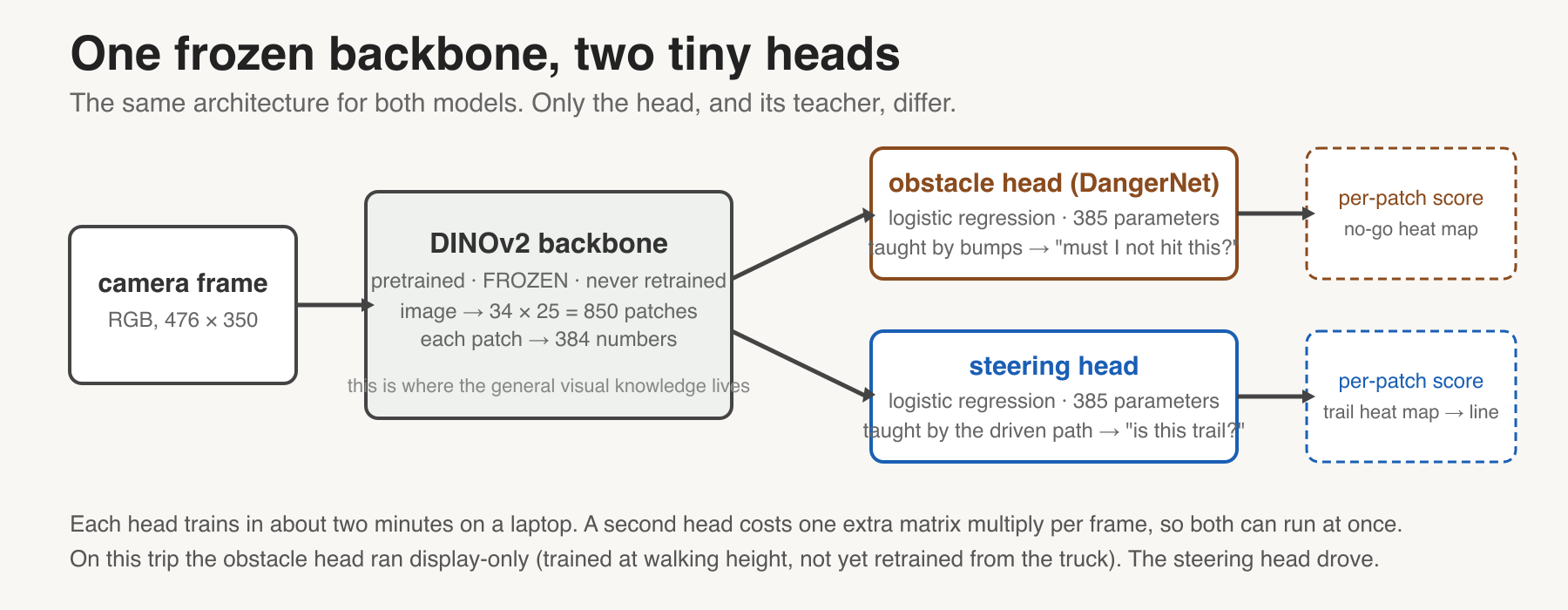
<p>Both models are the same shape (Figure 4): a frozen DINOv2 vision backbone that turns each image
into a grid of 850 patch features, and on top of it a tiny logistic-regression head, one per model,
that scores each patch. The obstacle head answers &quot;must I not hit this?&quot;; the steering head answers
&quot;is this trail?&quot;. Each head is 385 numbers and trains in a couple of minutes on a laptop. At runtime
they see RGB pixels, nothing else.</p>
<figure>
<img src="/assets/robo-log2/one-backbone-two-heads.png" alt="Figure 4. One frozen backbone, two tiny heads.">
<figcaption><span class="figno">Figure 4.</span> The backbone is pretrained and never changes; it is where the general visual knowledge lives. Each head is a 385-parameter classifier over the backbone's patch features. The expensive part, the backbone pass, is shared, so a second head costs one extra matrix multiply. The driving tool has a flag to run both on the same frame. On these trips the obstacle head was logged and drawn on the display only; it never steered.</figcaption>
</figure>
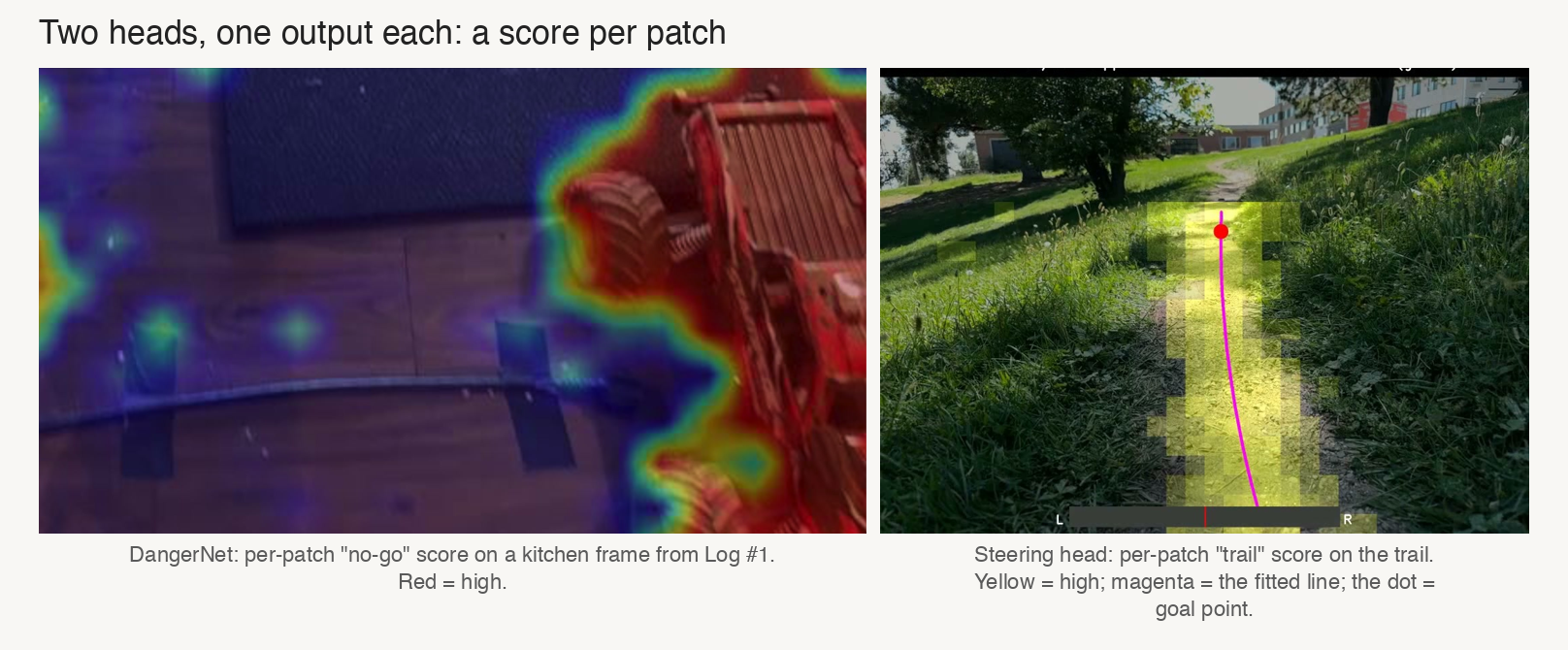
<p>Each head answers one yes/no question for every patch, independently, and the answer is a score
from 0 to 1 (Figure 5). A heat map is just those 850 scores painted over the frame.</p>
<figure>
<img src="/assets/robo-log2/per-patch-scores.png" alt="Figure 5. Per-patch scores from each head.">
<figcaption><span class="figno">Figure 5.</span> Left: DangerNet's no-go score per patch on a kitchen frame from Log #1, red high. Right: the steering head's trail score per patch on the trail, yellow high, with the line fitted through the row centres. Neither head knows what an object is; each only scores patches.</figcaption>
</figure>
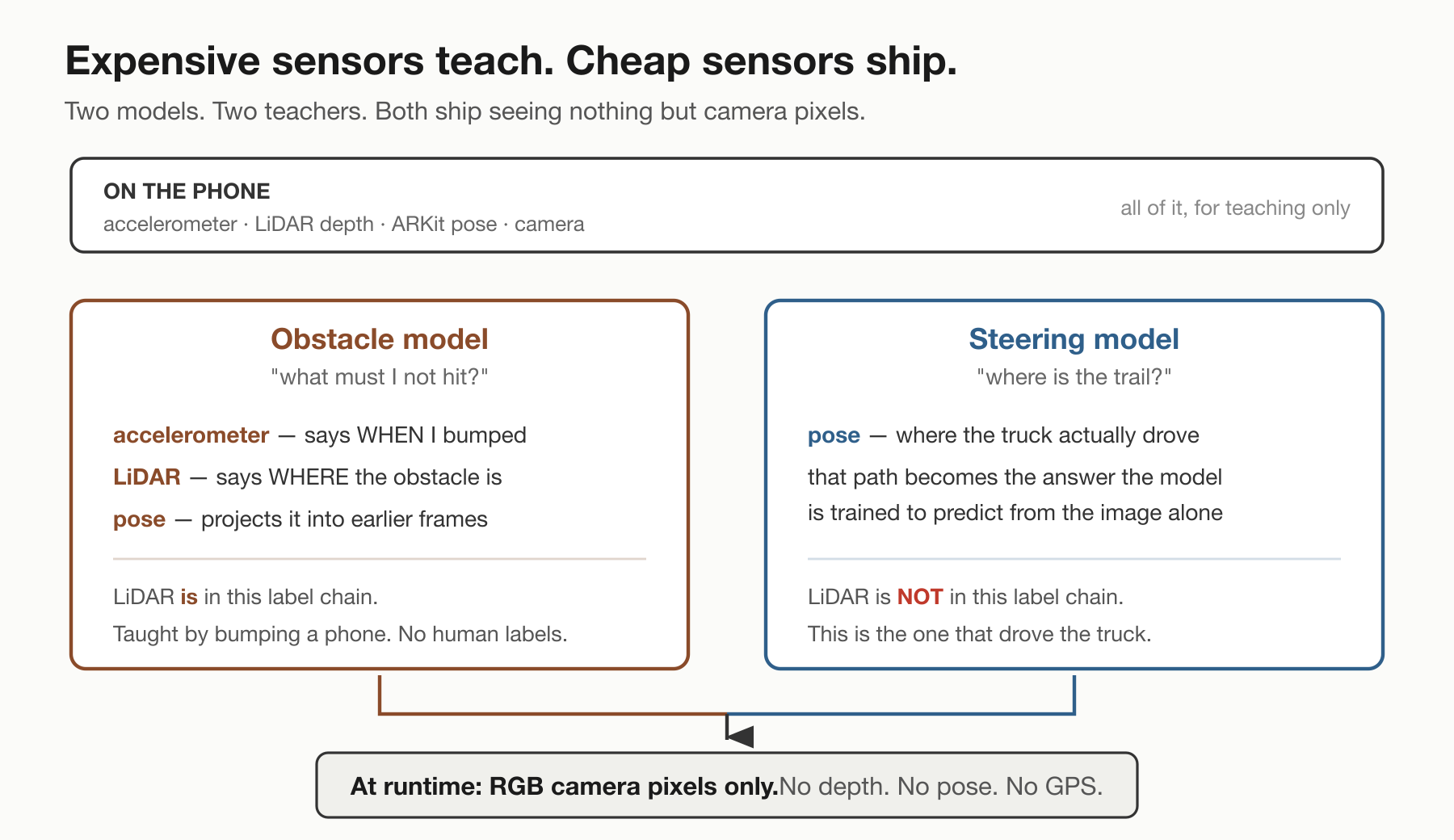
<p>On this trip the obstacle model ran display-only. It was trained handheld at walking height, and
at truck height on a trail it's out of its depth — literally. It gets retrained from the truck
next. The steering model is what drove. Which expensive sensor does the teaching depends on which
model you mean (Figure 6), and neither one keeps it.</p>
<figure>
<img src="/assets/robo-log2/two-teachers.png" alt="Figure 6. Expensive sensors teach, cheap sensors ship.">
<figcaption><span class="figno">Figure 6.</span> Which expensive sensor teaches depends on the model. Both ship seeing only camera pixels.</figcaption>
</figure>
<h2>3 · Live inference: getting the picture to the robot, fast</h2>
<h3>3.1 · The robot's eye is a phone, and it talks over one cable</h3>
<p>The video gets from the phone to the Orin over a single USB cable. No capture card, no wifi, no
radio link for the video. That sounds unremarkable until you try it. The published failure reports from people trying this
describe the phone never appearing at all: <a href="https://github.com/libimobiledevice/usbmuxd/issues/281">usbmuxd
#281</a>, filed on the same phone and iOS
version I'm using, and <a href="https://github.com/marek-simonik/record3d/issues/120">record3d
#120</a>. It works here because the Orin's
<code>usbmuxd</code> is started with preflight disabled: the device enumerates and a tunnel binds before the
pairing handshake completes, which is the whole bypass.</p>
<p>Once it worked, I wanted to know whether it <em>kept</em> working, because the neighbouring reports
describe setups that connect and then die: <a href="https://github.com/libimobiledevice/usbmuxd/issues/215">usbmuxd
#215</a>, <em>&quot;it works fine for a random amount
of minutes, until it dies&quot;</em>, and <a href="https://github.com/marek-simonik/record3d/issues/72">record3d
#72</a>, a robot streaming from an iPhone over
USB with <em>&quot;variable lag in the video stream (1-3 seconds)&quot;</em>, open since 2023. So, a soak test.
Thirty minutes continuous:</p>
<table>
<thead>
<tr>
<th></th>
<th></th>
</tr>
</thead>
<tbody>
<tr>
<td>delivered rate</td>
<td>15.02 frames/s sustained</td>
</tr>
<tr>
<td>frames</td>
<td>27,000</td>
</tr>
<tr>
<td>gaps over 1 s</td>
<td><strong>0</strong></td>
</tr>
<tr>
<td>disconnects</td>
<td><strong>0</strong></td>
</tr>
</tbody>
</table>
<p>That was indoors, on a bench, in a cool room. Outside is a hotter place, and other people's phones
have overheated doing this. Hold that thought — the field had opinions about it.</p>
<h3>3.2 · How long does the robot take to see something?</h3>
<p>This matters because it sets the floor under everything downstream. The loop has three stages:
<strong>perception</strong> (what am I looking at?), <strong>control</strong> (what should I do about it?) and <strong>actuation</strong>
(move the steering servo). This delay sits in front of all three. Control engineers call it
<strong>dead time</strong>: however good the rest of the loop is, it is acting on a world that has already moved
on. At 1 m/s, 60 ms is 6 cm of travel before the robot sees anything at all. Dead time is also what
turns a confident controller into an oscillating one, so I needed the number.</p>
<p>The obvious approach doesn't work. You can't ask the phone &quot;when did you see this?&quot; The phone's
clock and the robot's clock are different clocks, and the question spans both.</p>
<p>Here's the intuition, and it's a yodel. You're alone on one side of a valley and you want to know
how long your voice takes to get across it. There's nobody over there to shout back. So you rig a
billboard on the far side that flashes the instant it hears you, you yodel <em>&quot;Yo!&quot;</em>, and you run a
stopwatch until you see the flash. No partner required: you made something happen at a moment you
knew, and you timed the consequence coming back.</p>
<p><em>(The yodel is for human intuition only. Nothing in the real rig makes a sound: light crosses a
valley far too fast to time with a stopwatch, which is exactly why the real measurement is all
visual, and why the slow thing being measured is the camera pipeline rather than any distance.)</em></p>
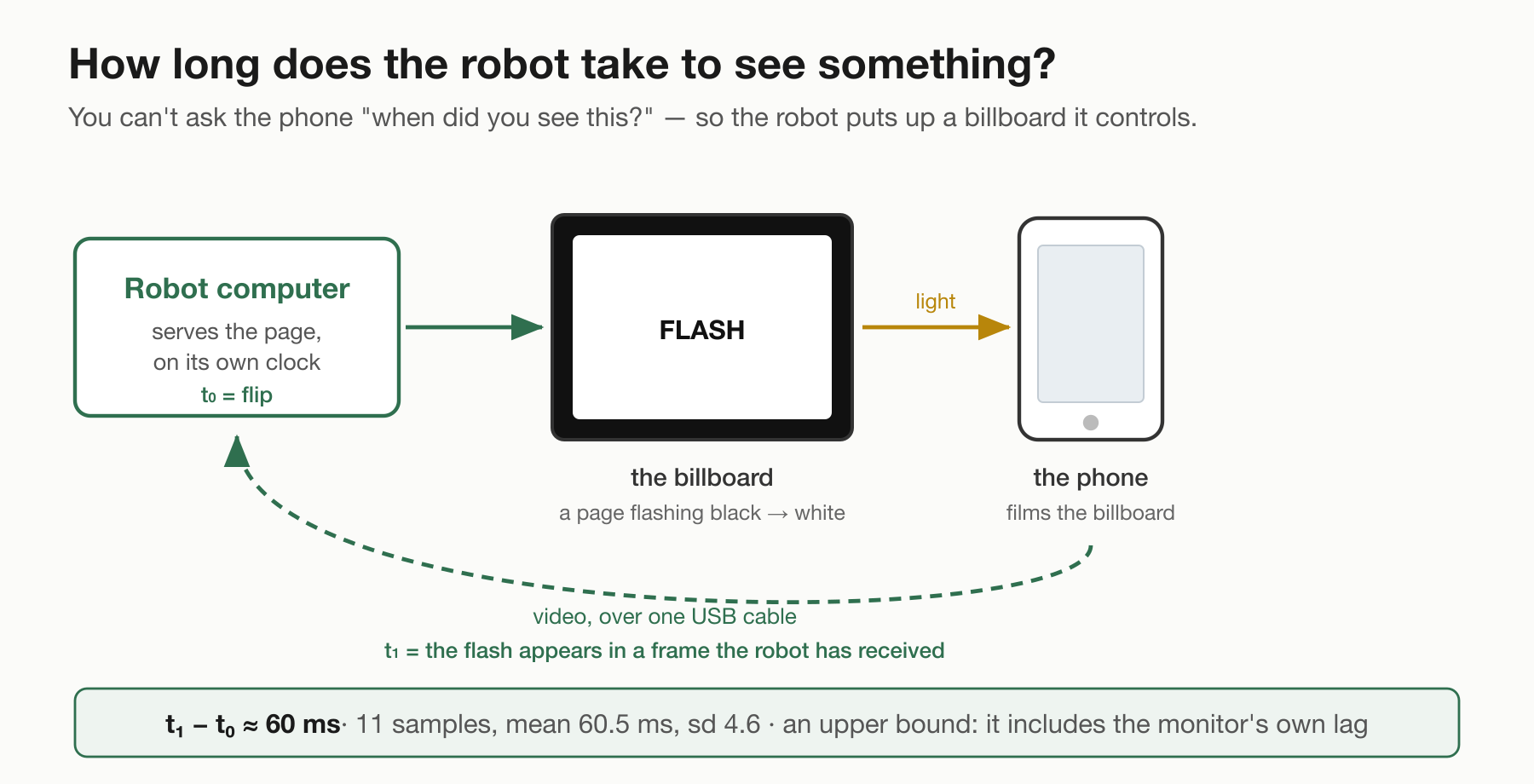
<p>So the robot rigs the same trick with light, on a billboard it controls (Figure 7). It serves a web page that flashes black to
white on a schedule set by its own clock; I put that page on a monitor and pointed the phone at it.
However long it takes for that flash to turn up in a frame the robot has actually received — that's
how long the robot takes to see the world.</p>
<figure>
<img src="/assets/robo-log2/billboard-rig.png" alt="Figure 7. The billboard rig.">
<figcaption><span class="figno">Figure 7.</span> The robot flashes a page on its own clock and watches, through the phone, for its own flash to arrive.</figcaption>
</figure>
<p><strong>About 60 milliseconds.</strong> Eleven clean flashes, mean 60.5 ms, standard deviation 4.6 ms.</p>
<p>Two things I have to say about that number. It's an <strong>upper bound</strong>: it includes the monitor's own
display lag, which this method can't separate out, so the camera path alone is faster. And &quot;eleven
clean&quot; means I threw four out: they came back at 322 to 990 ms, and in each of those the camera was
still recovering its exposure after the screen went dark, so it never saw a flash at all — excluded
on a brightness rule I'd set before seeing the numbers. I posted the 60 ms figure on a forum before
writing that down, which was the wrong order.</p>
<h3>3.3 · How a frame becomes a steering command</h3>
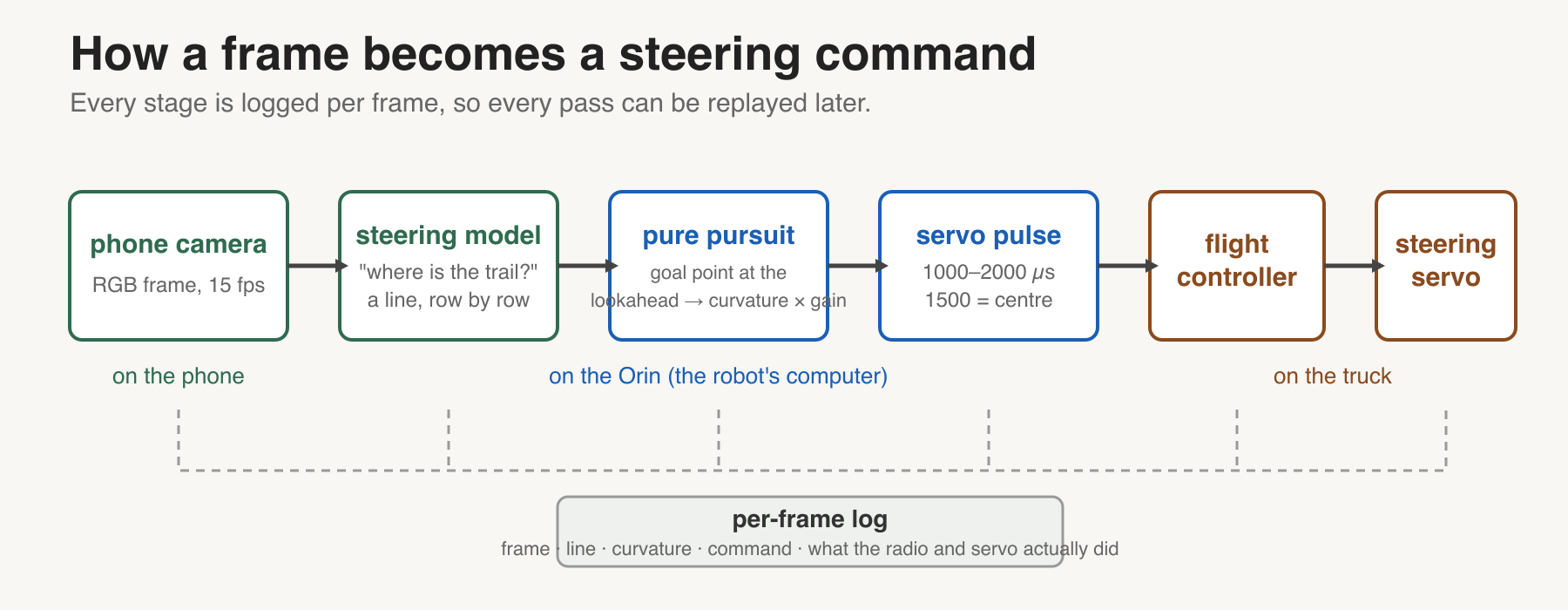
<p>Every frame, the steering model scores each patch for &quot;trail.&quot; In each row, the probability-weighted
centre of the patches it calls trail is that row's trail centre, rows where that mass is spread out
are dropped, and a line is fitted through the rest. That is the drawn trail centre. A steering law called <strong>pure pursuit</strong> picks
a goal point on that line a fixed distance ahead, the <strong>lookahead</strong>, and computes the curvature (in
1/m: how tightly the truck must turn) that would carry it through that point; a <strong>gain</strong> scales
how hard it steers for that curvature. The Orin converts the result to a servo pulse width (in
microseconds) and hands it to the flight controller, which drives the steering servo (Figure 8).
Every stage (the fitted line, the curvature, the command, and what the radio and servo actually
did) is logged per frame, so every pass can be replayed afterwards. That log is how every fault in
this post was found.</p>
<figure>
<img src="/assets/robo-log2/steering-signal-path.png" alt="Figure 8. Signal path.">
<figcaption><span class="figno">Figure 8.</span> Camera to steering model to pure pursuit to servo pulse to flight controller to servo, with a log tap on every stage.</figcaption>
</figure>
<h2>4 · Day one: it drove itself</h2>
<p>First real trail, and it worked.</p>
<p>Five passes down the straight at the settings I'd ended up on (lookahead 2.0 m, gain about 1.8),
judged by a tripod I set up on the bank — a fixed camera watching
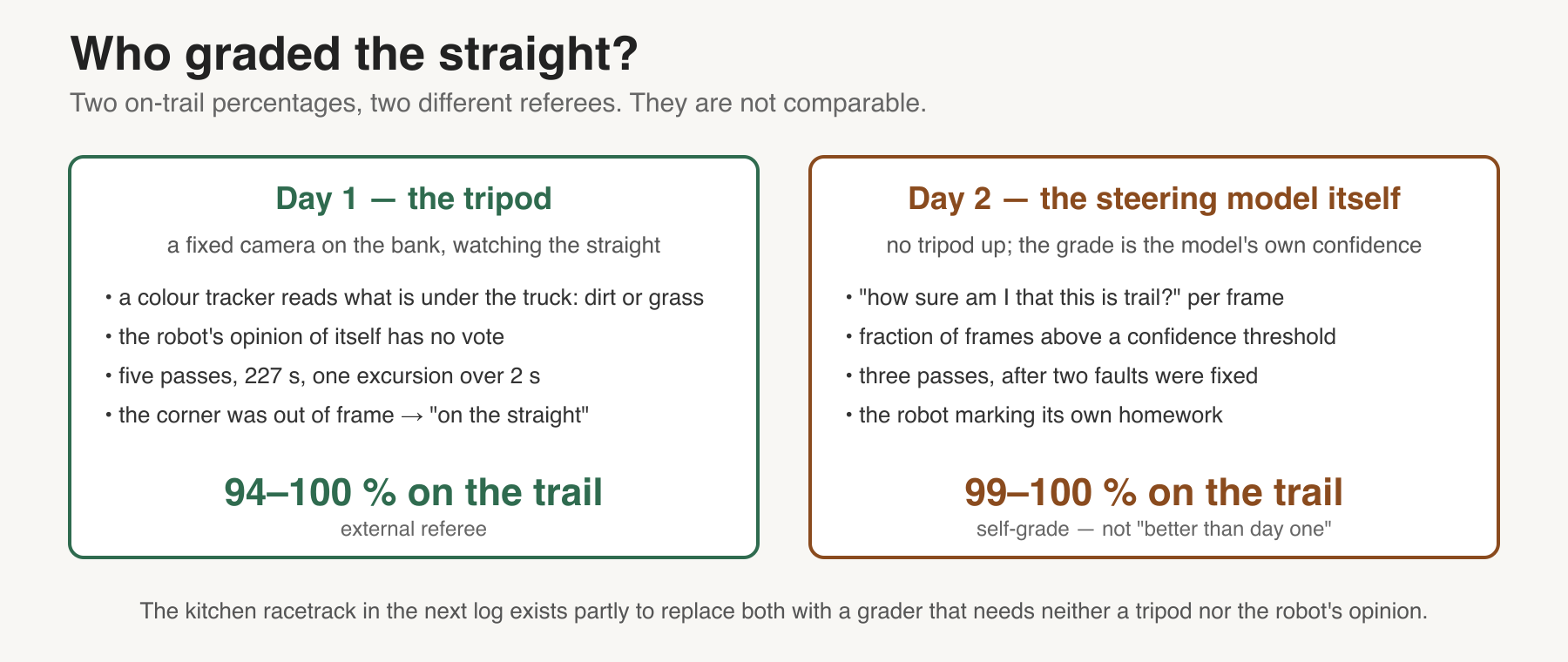
the truck, with a tracker reading the ground colour underneath it. <strong>94 to 100 % on the trail</strong> on
every pass, one excursion longer than two seconds in 227 seconds of driving.</p>
<p>I want to be exact about what that number covers: the tripod's view was fixed down the straight, and
<strong>the corner was out of frame.</strong> So it's a measurement of the straight. It is also not the robot
grading its own homework, which is the part I care about — the robot's own confidence had no vote.</p>
<p>Then the corner. It saw the turn and started it, and then it went one of two ways. At a low gain it
turned too gently: the curvature it was commanding climbed from 0.33 to 0.74 1/m, it asked for about
55 % of steering lock, and it arced wide into the grass. With the gain turned up it hunted everywhere,
straight or corner: 152 sign changes of the steering command in 319 seconds, weaving back and forth
across the trail.</p>
<p>The fix for the zigzag wasn't the gain. Standing there watching it, my read was &quot;we need to look
farther up the trail,&quot; which turns out to be pure pursuit's damping knob. Pushing the lookahead
from 1.5 m to 2.0 m cut the weaving by more than half (0.45 to 0.19 direction changes per second).
Nothing at that lookahead fixed the running wide.</p>
<h2>5 · Day two: the app broke, then the corner didn't yield</h2>
<p>Day two was the first field use of <strong>Robot Eyes</strong>, the iPhone app I'd built overnight. I'd been
recording training data with a scanner app and streaming live video with a separate one, and no
app did both from the same camera session. I wanted to gather training and validation data <em>while</em>
the model drove on the same frames. It's the tool that later lets you replay exactly what the
model saw and did. So I wrote one. It failed in the field in a way I'm glad happened early.</p>
<p>The phone got hot. ARKit throttled the camera to 20 frames/s, which is documented behaviour. The bug
was mine: the app decimated frames by a <em>fixed</em> divider, so when capture dropped to a third, what
reached the robot dropped to a third with it: 5 frames/s. The steering loop ended up running at
5 Hz. I fixed it sitting in the car between the afternoon and evening sessions, so I could keep
recording training data and driving live off the same frames that same day; the evening ran at
the full rate; the divider is now recomputed every second from the measured capture rate,
so the app targets a frame rate instead of a ratio. The proper bench acceptance that night found
two more defects, which is the argument for benches.</p>
<p>Heat is still the open problem, and I'd rather say what I'm doing about it than pretend it's
solved. What's actually in: the app now reports its own thermal state every second and halves the
video bitrate when iOS says the phone is struggling, so the robot at least knows, and I can read it
back afterwards from the session file. What I want to try, none of it tested yet: airplane mode, to
stop the phone spending power on radios it doesn't need; a small travel router on the truck so the
phone isn't running wifi at all; and settling whether running it on the charger helps or hurts,
because a charging battery is its own heat source. The phone is doing camera capture, depth,
motion tracking and video encoding at once, in the sun, which is a lot to ask of something designed
to live in a pocket.</p>
<p>The second fault I found with my hands rather than any log. Driving by hand on the way to the
trail, the truck tracked along the left edge, in the grass, exactly parallel to the trail. Strange.
I trimmed it straight on the transmitter. Then, under the model, it did exactly the same thing
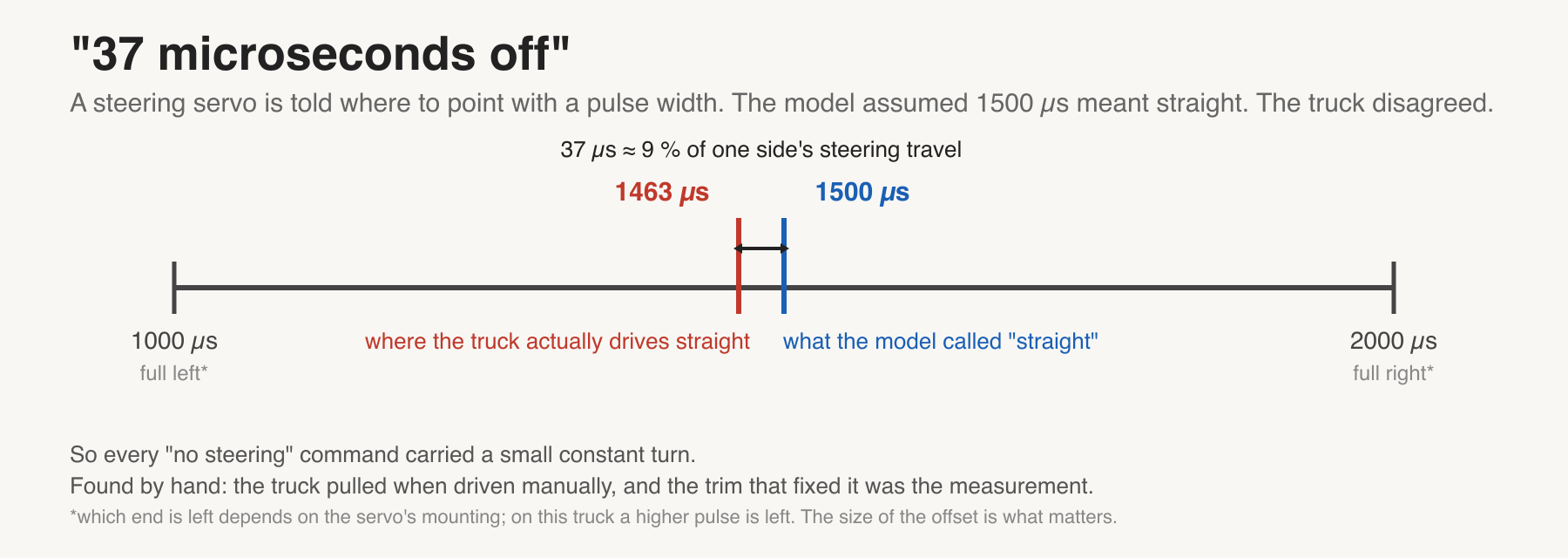
again. The transmitter's trim and the model's idea of &quot;straight&quot;
turn out to be two different numbers that can't see each other: a steering servo is commanded with a
pulse width, in microseconds, and the flight controller holds a centre value it calls straight
(1500 µs). The truck's actual straight was 1463 µs (Figure 9). So every time the model asked for
&quot;no steering,&quot; it got a little left: a constant bias, in control-theory terms a steady-state
error. Setting the flight controller's centre to 1463 fixed it. Pose data later confirmed the value
independently: fitting the truck's recorded path curvature against the servo pulse, the zero
crossing lands at 1461.2 µs — 1.8 µs from the number I set by feel.</p>
<figure>
<img src="/assets/robo-log2/steering-neutral-37us.png" alt="Figure 9. Steering neutral.">
<figcaption><span class="figno">Figure 9.</span> The flight controller's centre pulse against the truck's real straight. 37 µs is about 9 % of one side's steering travel — enough to drift.</figcaption>
</figure>
<p>With both fixed, the straight held: <strong>99–100 % on the trail</strong> across three passes, measured on the
straight. But that number is graded differently: the tripod wasn't up, so it comes from a second small
classifier on the robot that reports whether the camera is looking at trail, the robot's own
trail head (Figure 10). It's the robot marking its
own homework, which is exactly what day one's number wasn't, so it isn't comparable and I'm not
claiming it as an improvement.</p>
<figure>
<img src="/assets/robo-log2/two-graders.png" alt="Figure 10. Two graders.">
<figcaption><span class="figno">Figure 10.</span> Day one's number came from an external referee; day two's from a classifier on the robot. They are not the same measurement.</figcaption>
</figure>
<p>And then I spent the rest of the session on the corner, systematically: one knob at a time. I
kept a matrix table of the settings, and I moved the tripod to the corner and used it to count how
many times the truck left the trail, because I wanted empirical validation and it was too much to
hold in my head. Every lookahead from 1.0 to 3.0 metres at one gain, plus one pass at a higher gain:
seven passes, one per cell, and the log of each one pulled and graded before the next.</p>
<p><strong>It didn't work. Not one of them held the turn.</strong> Every pass left the trail in the bend or just
after it, and rejoined further on. Short lookahead, long lookahead, more gain: the truck ran wide
every single time.</p>
<p>And the sweep couldn't even tell me which way to go next. A 2.5 m lookahead graded worst and 2.8 m
graded best, which isn't physics — it's two single passes at different speeds on different entry
lines. Across two field days I'd tried every lookahead from one to three metres and gains from 1.0
to 2.1. None of them made the corner, and the differences between them were noise.</p>
<h2>6 · The trail can't measure this problem</h2>
<p>That's the actual finding, and it took me embarrassingly long to see it as one.</p>
<p>I was trying to tune the steering law with a test that couldn't resolve the thing being tuned. The
throttle was my trigger finger, so no two passes entered the bend at the same speed or on the same
line, and with one pass per setting I couldn't rank two lookaheads half a metre apart under that
spread. Speed and entry line were uncontrolled variables, and they were bigger than the variable I
was changing.</p>
<p>So the answer isn't a better gain. It's a controlled course, where speed is held and the same lap
repeats, and a grader that needs neither a tripod nor the robot's opinion.</p>
<p>I built a racetrack out of blue tape on my kitchen floor.</p>
<p>That's the next log.</p>
<hr>
<h2>What I'm not claiming</h2>
<ul>
<li><strong>Corners. At all.</strong> Two field days, every setting I could turn, unsolved.</li>
<li>The 94–100 % and 99–100 % figures are <strong>the straight</strong>, not the trail as a whole, and they were
graded by different referees.</li>
<li>The 30-minute streaming soak was <strong>indoors on a bench</strong>. The one outdoor test thermally
throttled, which is the opposite of a pass.</li>
<li>One park, one operator, one vehicle, daylight, dry. No transfer claim of any kind.</li>
<li>The USB cable carries video. Whether it also charges the phone on the truck, I haven't measured.</li>
<li>Three global-shutter cameras are on the bench being evaluated as a future upgrade for the
truck. Everything above runs on the phone.</li>
</ul>
<h2>Glossary</h2>
<ul>
<li><strong>Self-supervised learning (as used here)</strong>: supervised training where the labels are written
by the robot's other sensors (LiDAR, motion tracking, accelerometer) rather than by a person.
There is still an answer key; a sensor wrote it. (The pretrained DINOv2 backbone is
self-supervised in the other, stricter sense: it learned from images with no labels at all.)</li>
<li><strong>Per-patch classifier</strong>: each head answers one yes/no question for every one of the 850
patches in a frame, independently: DangerNet asks &quot;is this patch dangerous?&quot;, the steering head
asks &quot;is this patch trail?&quot;. The output is a score from 0 to 1 per patch, which is what the heat
maps show; a score is an output, not one of the 385 learned weights.</li>
<li><strong>Backbone / head</strong>: the backbone (DINOv2) is a large pretrained vision model that turns an
image into a grid of feature vectors and is never retrained; a head is a small classifier on top
of those features. Each head here has 385 parameters.</li>
<li><strong>Patch</strong>: one cell of the 34 × 25 grid the backbone divides each image into; every label and
every prediction is per patch.</li>
<li><strong>Pose</strong>: the phone's motion-tracking estimate of where the camera is and which way it points,
every frame. The steering model's labels come from it.</li>
<li><strong>Pure pursuit</strong>: a steering law: aim at a goal point a fixed distance ahead on the desired path
and steer along the arc that reaches it.</li>
<li><strong>Lookahead</strong>: how far up the path the goal point sits, in metres. Longer damps oscillation but
cuts corners.</li>
<li><strong>Gain</strong>: a multiplier on the computed steering. Too low turns too gently; too high oscillates.</li>
<li><strong>Curvature (1/m)</strong>: how tightly a path bends; the reciprocal of the turning radius. 0.74 1/m is
a 1.35 m radius.</li>
<li><strong>Pulse width (µs)</strong>: how a servo is commanded: a pulse between roughly 1000 and 2000
microseconds, with ~1500 as centre.</li>
<li><strong>Steady-state error</strong>: a constant offset the controller never corrects on its own. The 37 µs
neutral offset was one.</li>
<li><strong>Control loop rate (Hz)</strong>: how many times per second the robot sees a frame and issues a
command. 15 Hz by design; 5 Hz when the app broke.</li>
<li><strong>Glass-to-application latency</strong>: the time from light hitting the camera to the frame being
available to the robot's software. ~60 ms here, as an upper bound.</li>
<li><strong>Thermal throttling</strong>: the phone reducing camera rate to control temperature. Documented iOS
behaviour, not a fault.</li>
<li><strong>Soak test</strong>: running the system continuously for a long time to find failures that only
appear with time.</li>
<li><strong>On-trail %</strong>: fraction of driving time the truck was over trail rather than grass, per pass.
Day one: judged by a tripod camera with a colour tracker. Day two: the robot's own trail head.</li>
</ul>
<p><em>Full build notes, including every wall I hit and how I got past it, are in the <a href="https://vaguebutexciting.dev/posts/robot-troubleshooting-guide/">troubleshooting
guide</a>. Video: Log #1's film is
<a href="https://www.youtube.com/watch?v=4TfdhlGQR4A">here</a>; Log #2's six short clips land on the same
channel, one a week. Previous log: <a href="https://vaguebutexciting.dev/posts/kitchen-robot-eyes-log1/">I rearranged my kitchen to fool my robot. It found the truck
anyway</a>.</em></p>
]]></content>
	</entry>
	<entry>
		<title>Troubleshooting a phone-eyed RC robot: the walls we hit, and how we got past them</title>
		<link href="https://vaguebutexciting.dev/posts/robot-troubleshooting-guide/"/>
		<id>https://vaguebutexciting.dev/posts/robot-troubleshooting-guide/</id>
		<updated>2026-09-10T00:00:00.000Z</updated>
		<summary>Build-notes companion to Log #2. ExpressLRS binding and CRSF, ArduPilot&#39;s silent companion failsafe, ROS 2 and JetPack on a Jetson, streaming an iPhone over USB, and self-supervised labelling — every entry cost us real time, and every claim is tagged measured, reported, claim or estimate.</summary>
		<content type="html"><![CDATA[<p><strong>Audience:</strong> anyone converting a hobby RC vehicle into an autonomy testbed: ExpressLRS radio,
ArduPilot flight controller, Jetson companion computer, phone as a sensor. Roughly our build.</p>
<p><strong>How to read the tags:</strong> <strong>[measured]</strong> we ran it, method stated ·
<strong>[reported]</strong> someone identifiable measured it, on their hardware · <strong>[claim]</strong> a vendor said
so and nobody checked · <strong>[estimate]</strong> reasoned, never measured · <strong>[none found]</strong> we looked and
found nothing, which is itself a result.</p>
<p>Every entry is something that actually cost us time. Nothing here is hypothetical.</p>
<hr>
<h2>1 · ExpressLRS won't bind</h2>
<h3>Your receiver is powered through an ESC, and power-cycle bind does nothing</h3>
<p><strong>Symptom.</strong> The receiver blinks steadily, never enters bind mode, and pressing Bind on the
transmitter does nothing. Link quality stays at zero.</p>
<p><strong>What worked.</strong> Stop cycling the ESC's switch. <strong>Unplug the receiver's servo lead and reseat
it</strong>: that cuts power at the receiver itself. Three cycles, then leave it seated, then press Bind.
Bound on the first attempt after doing this. <strong>[measured]</strong>: RadioMaster ER5C-i on a Traxxas
XL-5, 2026-09-05.</p>
<p><strong>Why we think it happens.</strong> The ESC's capacitors likely hold the receiver's supply up through
the switch, so it never sees clean interruptions to count. <strong>[estimate]</strong>: we did not put a
scope on the rail and did not measure how long the 6 V line stays up. The fix is verified; the
explanation is not.</p>
<h3>Each power-cycle has to be brief</h3>
<p>Roughly <strong>one second powered</strong>, then off. More than about two seconds and ExpressLRS resets its
counter, so a slow, careful sequence fails where a brisk one works. <strong>[measured]</strong>, consistent
with documented ELRS behaviour.</p>
<h3>You're reading the wrong version number</h3>
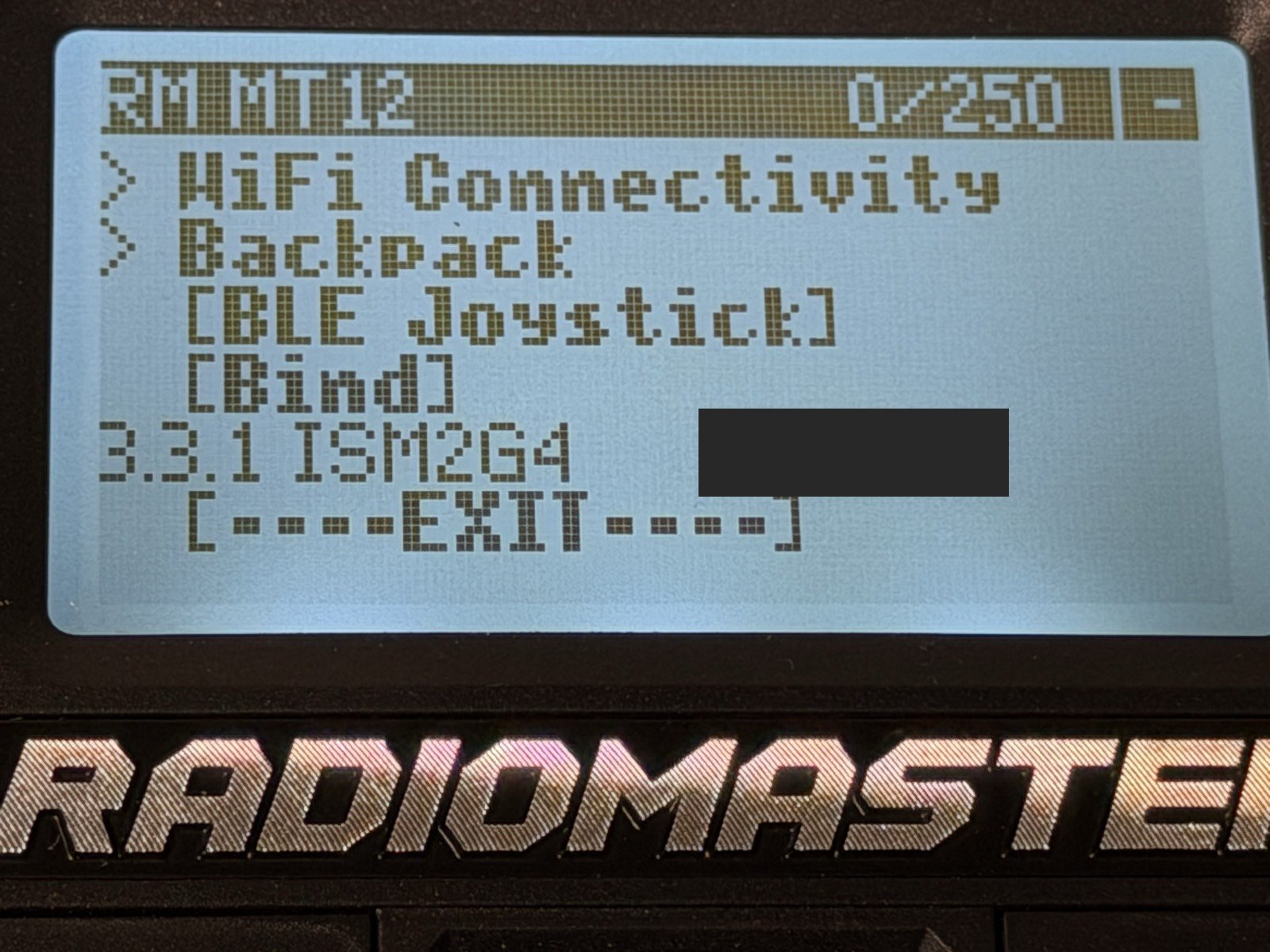
<p>On an EdgeTX radio, <code>SYS → Version</code> is <strong>EdgeTX</strong>, the radio's operating system. It has nothing
to do with binding. The number that matters is the <strong>ExpressLRS module firmware</strong>, at the bottom
of <code>SYS → Tools → ExpressLRS</code>. <strong>[measured]</strong></p>
<p><img src="/assets/robo-log2/troubleshooting/mt12-elrs-version-and-bind.jpg" alt="MT12 ExpressLRS Lua screen, bottom: the Bind entry above a version line reading 3.3.1 ISM2G4"></p>
<p><em>The bottom of the ELRS Lua screen. <code>[Bind]</code> sits directly above the version line <code>3.3.1 ISM2G4</code>,
which is both the firmware version that governs binding and the regulatory domain. (The
transmitter's binding UID, shown beside it, is redacted here: it is the bind key.)</em></p>
<h3>Checking FCC vs LBT</h3>
<p>Read it off the same ELRS screen, not the box. <strong><code>ISM2G4</code> is the non-LBT domain</strong> (full power);
an EU/LBT build reads <strong><code>CE2G4</code></strong>. <strong>[measured]</strong></p>
<h3>Versions don't have to match exactly</h3>
<p>ExpressLRS breaks over-the-air compatibility across a <strong>minor</strong> version change (3.3 → 3.4), not a
patch. Our TX on <strong>3.3.1</strong> bound to a receiver on <strong>3.3.0</strong> with no flashing. <strong>[measured]</strong></p>
<h3>Still no link — check these three before reflashing anything</h3>
<table>
<thead>
<tr>
<th>Setting</th>
<th>Value that works</th>
</tr>
</thead>
<tbody>
<tr>
<td><strong>Model Match</strong></td>
<td><code>Off</code>. A mismatch here silently prevents a link with no error anywhere</td>
</tr>
<tr>
<td><strong>External RF</strong></td>
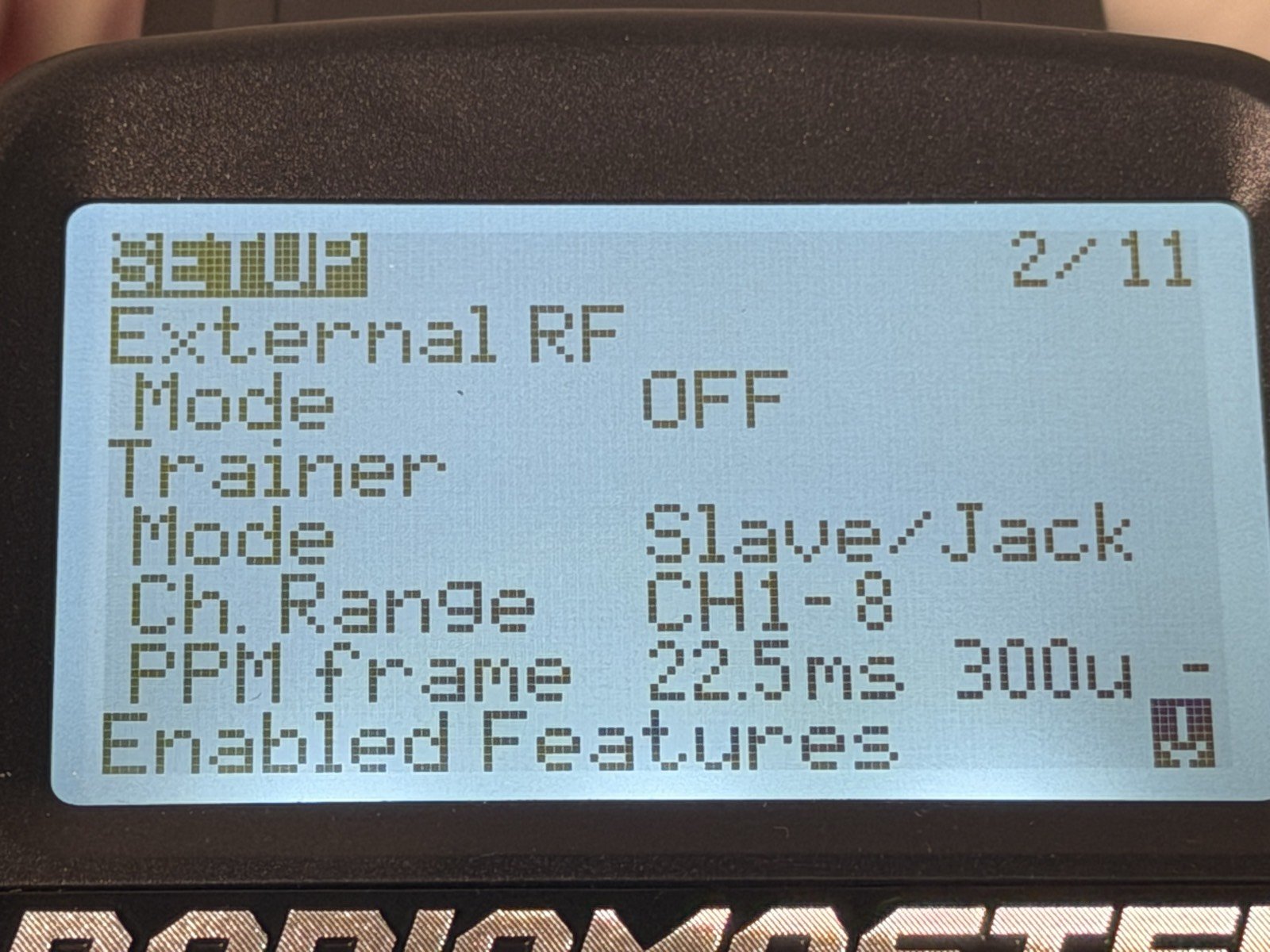
<td><code>OFF</code> when using an internal module</td>
</tr>
<tr>
<td><strong>Internal RF Mode</strong></td>
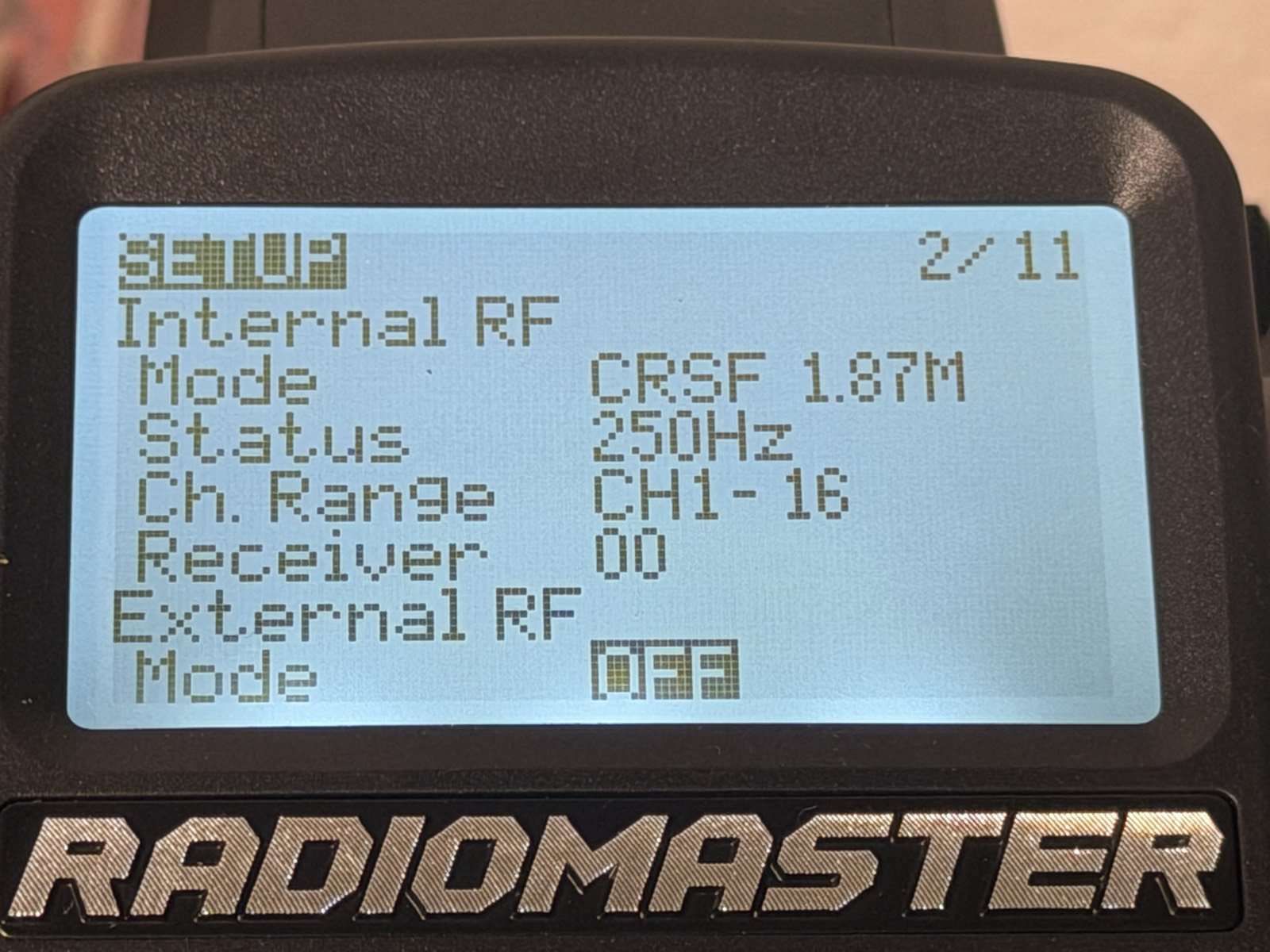
<td><code>CRSF</code></td>
</tr>
</tbody>
</table>
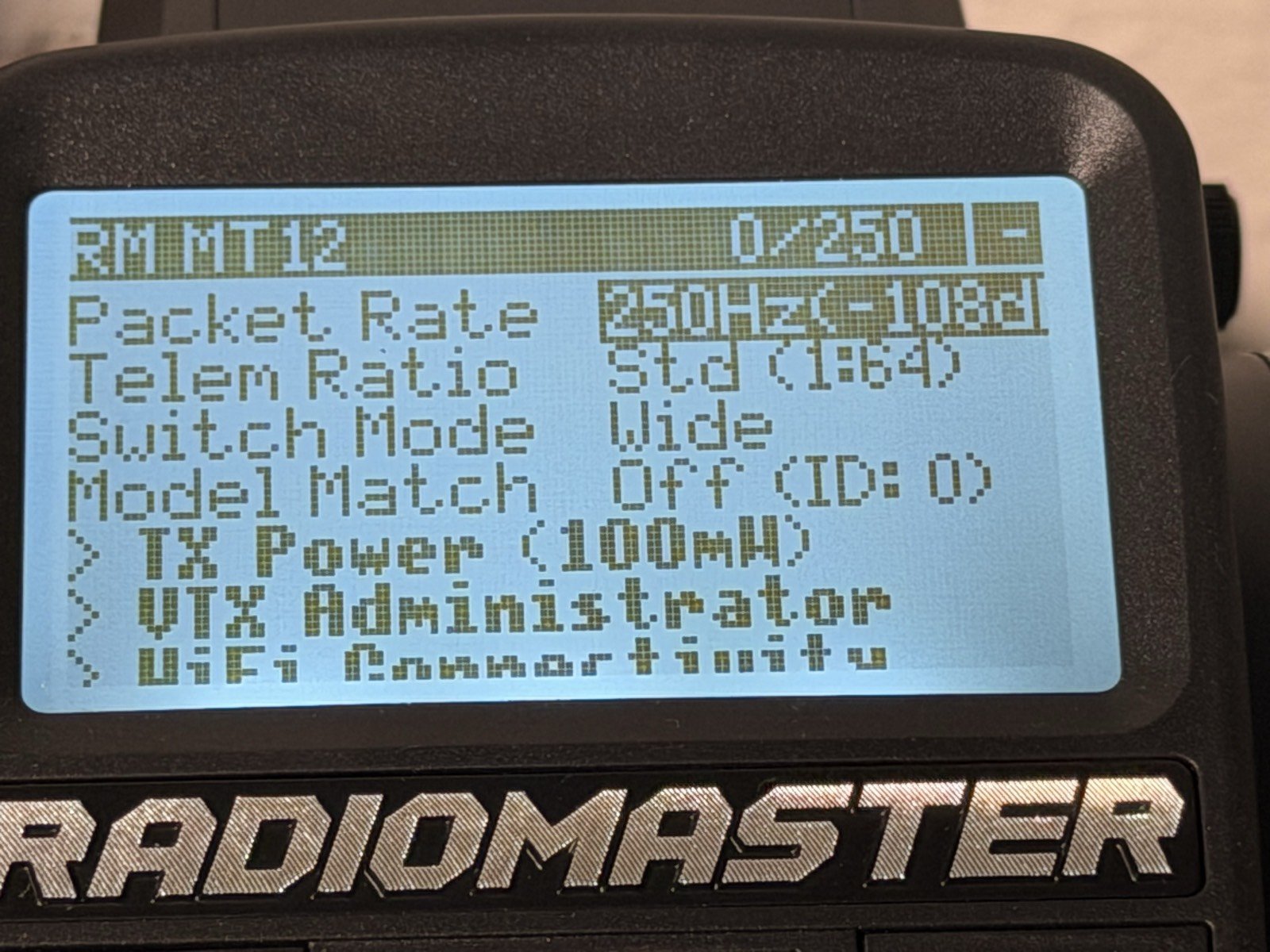
<p>The <code>0/250</code>-style figure in the Lua screen header is <strong>link quality</strong>. Zero means no packets at
all, which points at binding rather than configuration. <strong>[measured]</strong></p>
<p><img src="/assets/robo-log2/troubleshooting/mt12-elrs-lua-config.jpg" alt="MT12 ExpressLRS Lua config screen showing packet rate 250Hz, telemetry ratio, switch mode, Model Match off, TX power, and a 0/250 link-quality reading in the header"></p>
<p><em>A known-good ELRS configuration, with <code>0/250</code> in the header: link quality zero, meaning no
packets at all. Note <code>Model Match: Off</code>; a mismatch there prevents a link with no error anywhere.</em></p>
<p><img src="/assets/robo-log2/troubleshooting/mt12-internal-rf.jpg" alt="MT12 Model Setup page showing Internal RF mode CRSF 1.87M at 250Hz over channels 1-16">
<img src="/assets/robo-log2/troubleshooting/mt12-external-rf-off.jpg" alt="MT12 Model Setup page showing External RF mode set to OFF"></p>
<p><em>Internal RF in <code>CRSF</code> mode, External RF <code>OFF</code>. Both screens are the same Model Setup page, scrolled.</em></p>
<h3>Last resort: talk to the receiver directly</h3>
<p>Leave the receiver powered with no bound transmitter for <strong>~60 seconds</strong>. It gives up and
broadcasts its own WiFi access point; connect and browse to <strong><code>10.0.0.1</code></strong>. That page reports the
receiver's real firmware version, whether a <strong>binding phrase</strong> is set (a phrase makes traditional
binding impossible, which is the other common cause of exactly these symptoms), and it offers a
flash button. If no access point appears after two minutes, the receiver isn't booting. <strong>[claim]</strong>,
vendor-documented behaviour; we did not need to use it.</p>
<h3>Don't trust port labels when swapping receivers</h3>
<p>Traxxas receivers carry three channel ports <strong>plus a battery port</strong>, which reads at a glance as a
duplicate channel. <strong>Map by what the wire physically connects to</strong> (steering servo to CH1, ESC to
CH2), not by matching printed numbers between two different manufacturers. Both the Traxxas TQ
#6519 and the RadioMaster ER5C-i use <strong>black for negative</strong>, so plugs transfer without adapting.
<strong>[measured]</strong></p>
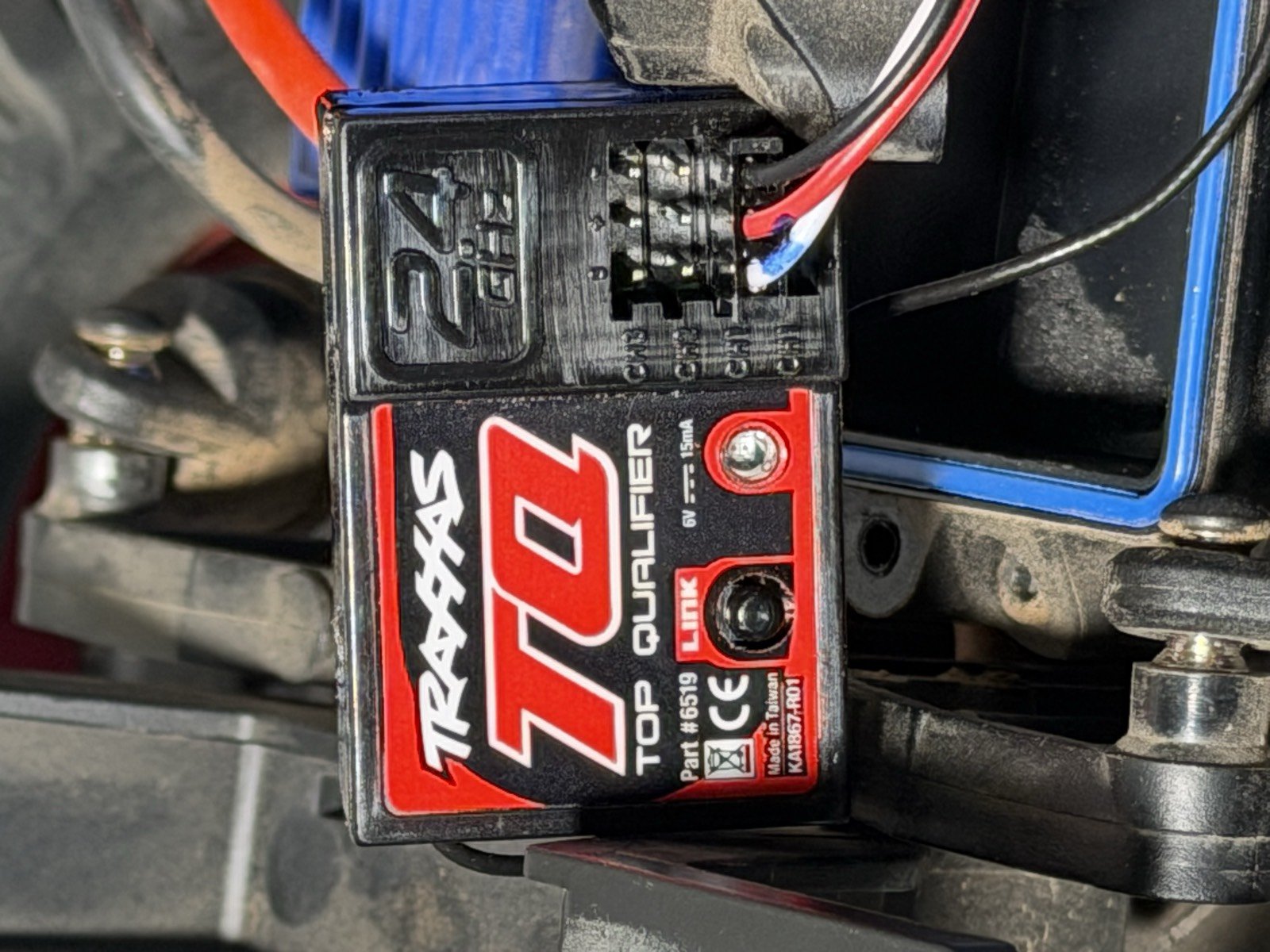
<p><img src="/assets/robo-log2/troubleshooting/traxxas-tq-6519-ports.jpg" alt="Traxxas TQ 6519 receiver mounted in the truck, showing its row of ports and a label reading 6V 15mA"></p>
<p><em>The stock Traxxas TQ #6519. The port block carries three channels plus a battery port — at a
glance it reads as a duplicate channel. Its own label states <code>6V / 15mA</code>, which is the supply the
replacement receiver will see.</em></p>
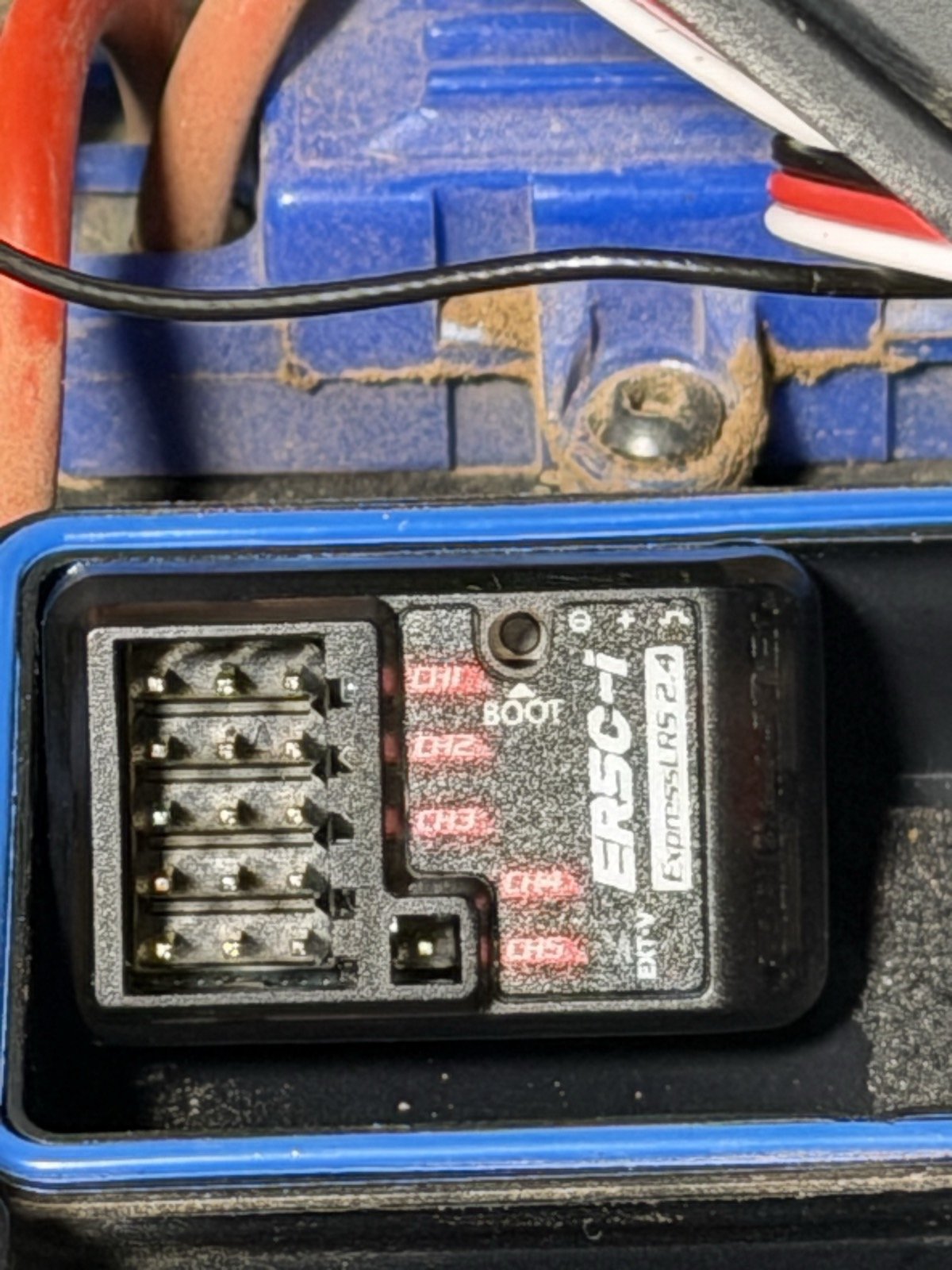
<p><img src="/assets/robo-log2/troubleshooting/er5c-i-channel-labels.jpg" alt="RadioMaster ER5C-i receiver, showing channel labels CH1 through CH5, a BOOT button, an EXT-V two-pin header, and five shrouded three-pin headers"></p>
<p><em>The ER5C-i. Five shrouded 3-pin headers labelled <code>CH1</code>–<code>CH5</code>, a <code>BOOT</code> button, and a separate
2-pin <code>EXT-V</code> header — that last one is an external voltage telemetry input, <strong>not</strong> a channel.</em></p>
<p>The TQ #6519's own label reads <strong>6 V</strong>, comfortably inside the ER5C-i's stated 4.5–8.4 V input
range <strong>[claim]</strong>, so no level shifting is needed on this combination.</p>
<hr>
<h2>1b · Getting CRSF out of an ExpressLRS PWM receiver</h2>
<p>Your flight controller can't read individual PWM channels: it wants one serial stream. On a PWM
receiver you get that by repurposing an output pin. Everything below is <strong>[measured]</strong> on a
RadioMaster ER5C-i, firmware <strong>3.3.1 ISM2G4</strong>, 2026-09-05.</p>
<h3>First: reaching the receiver's web page at all</h3>
<p>The receiver hosts a config page on its own WiFi. Four things cost us most of an hour.</p>
<p><strong>The transmitter must be OFF.</strong> If the radio is on, the receiver stays linked and never starts
WiFi. Turn it off and leave it off.</p>
<p><strong>It takes minutes, not the 60 seconds the setting implies.</strong> The &quot;WiFi auto on interval&quot; reads
60, but the network took several minutes to appear. Don't conclude it failed at ninety seconds.</p>
<p><strong>Better: command it into WiFi mode from the radio.</strong> <code>SYS → Tools → ExpressLRS → WiFi Connectivity</code> has an option to enable WiFi on the <em>receiver</em>. That's far more reliable than
waiting for a timeout that fires only when the receiver gives up looking.</p>
<p><strong>Network <code>ExpressLRS RX</code>, password <code>expresslrs</code>.</strong></p>
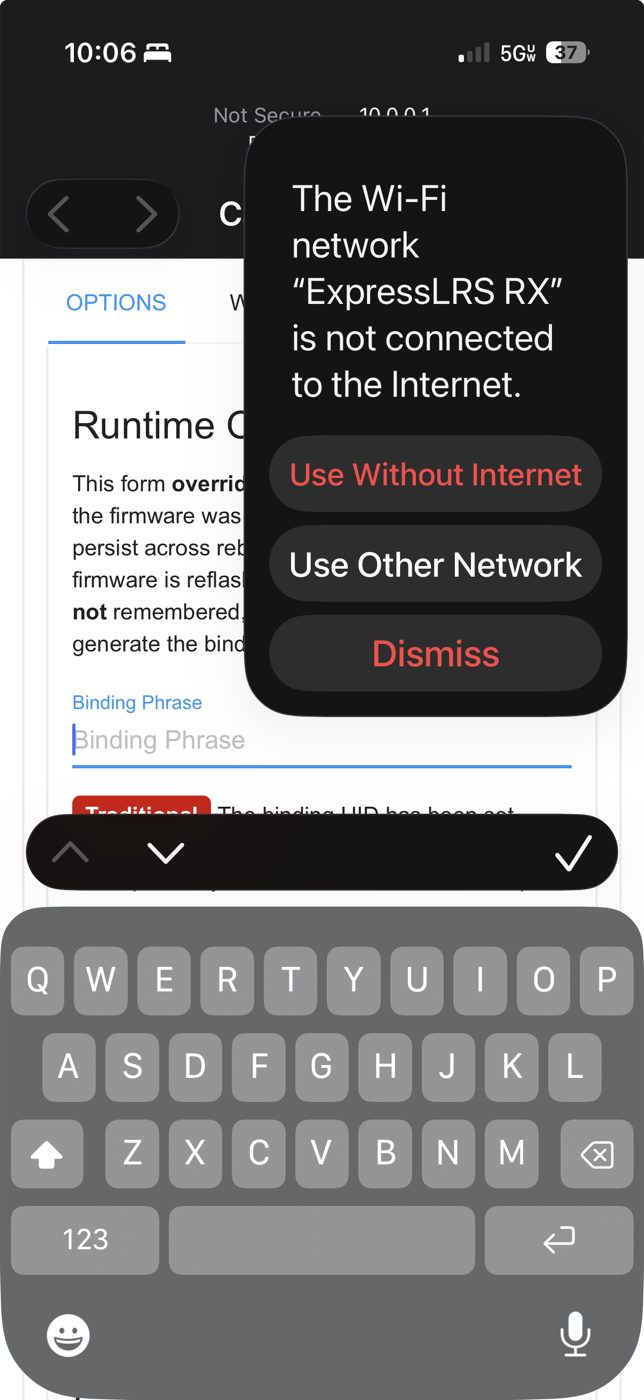
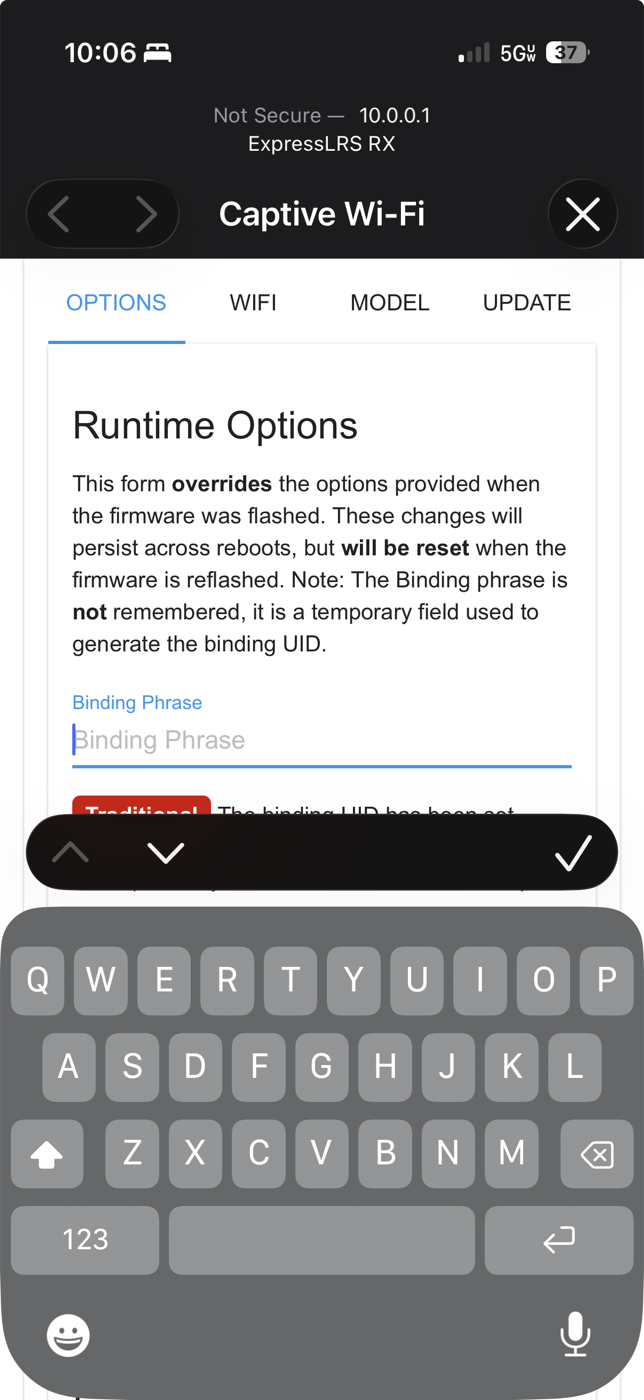
<p><strong>🔴 Escape iOS's captive-portal browser.</strong> Connecting pops a cut-down &quot;Captive Wi-Fi&quot; window.
The page renders, but the tabs don't respond — you can look and not touch. Close it, choose
<strong>Use Without Internet</strong> when iOS asks, then load <code>10.0.0.1</code> in <strong>Safari</strong> proper.</p>
<p><img src="/assets/robo-log2/troubleshooting/elrs-ios-use-without-internet.png" alt="iOS prompt: the Wi-Fi network ExpressLRS RX is not connected to the Internet, with options Use Without Internet, Use Other Network, Dismiss"></p>
<p><em>Choose <strong>Use Without Internet</strong>. &quot;Dismiss&quot; or &quot;Use Other Network&quot; drops you off the receiver.</em></p>
<p><img src="/assets/robo-log2/troubleshooting/elrs-captive-portal-trap.png" alt="The iOS Captive Wi-Fi mini browser showing the ExpressLRS page with OPTIONS WIFI MODEL UPDATE tabs"></p>
<p><em>The captive window. It looks right and the tabs do nothing. This is the trap.</em></p>
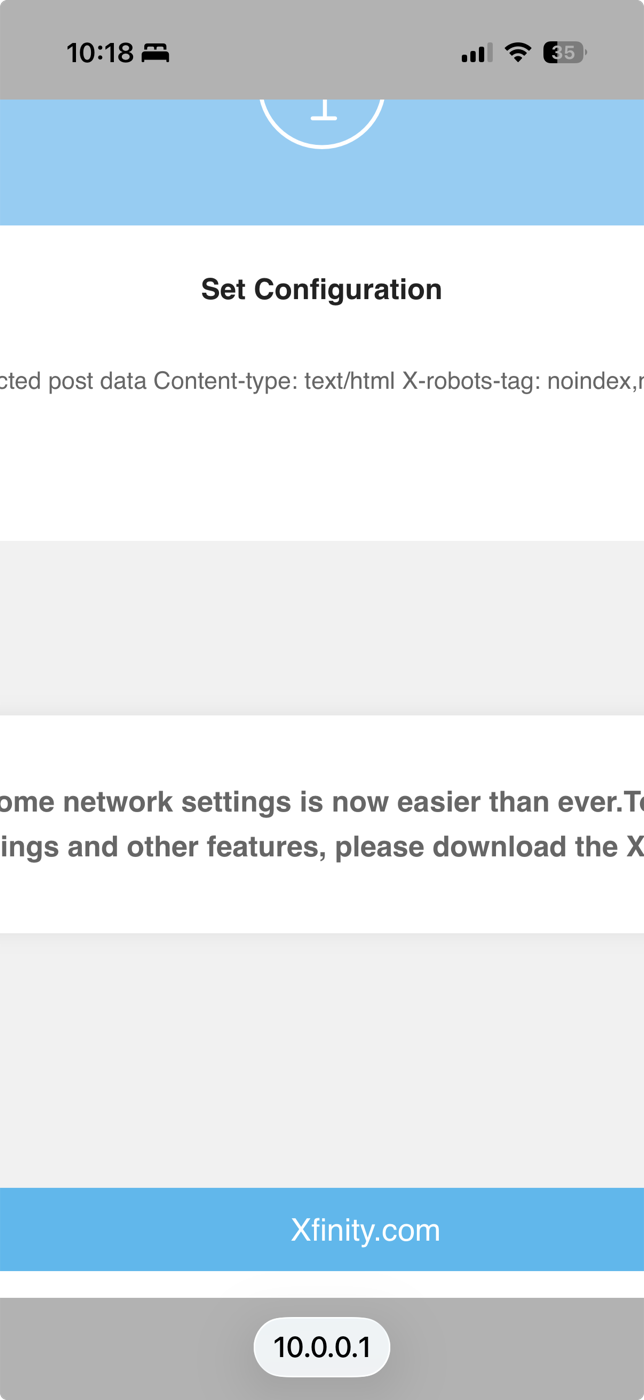
<p><strong>🔴 And <code>10.0.0.1</code> is also a very common home-router address.</strong> The moment the phone falls back
to house WiFi, the same URL quietly serves your gateway instead of the receiver — for us, an
Xfinity page. <strong>Check the page header says ExpressLRS before you trust anything on it.</strong></p>
<p><img src="/assets/robo-log2/troubleshooting/elrs-10001-hit-the-home-router.png" alt="A page at 10.0.0.1 showing Xfinity home-network content instead of the ExpressLRS interface"></p>
<p><em>Same address, wrong device. The phone had dropped back to the house network.</em></p>
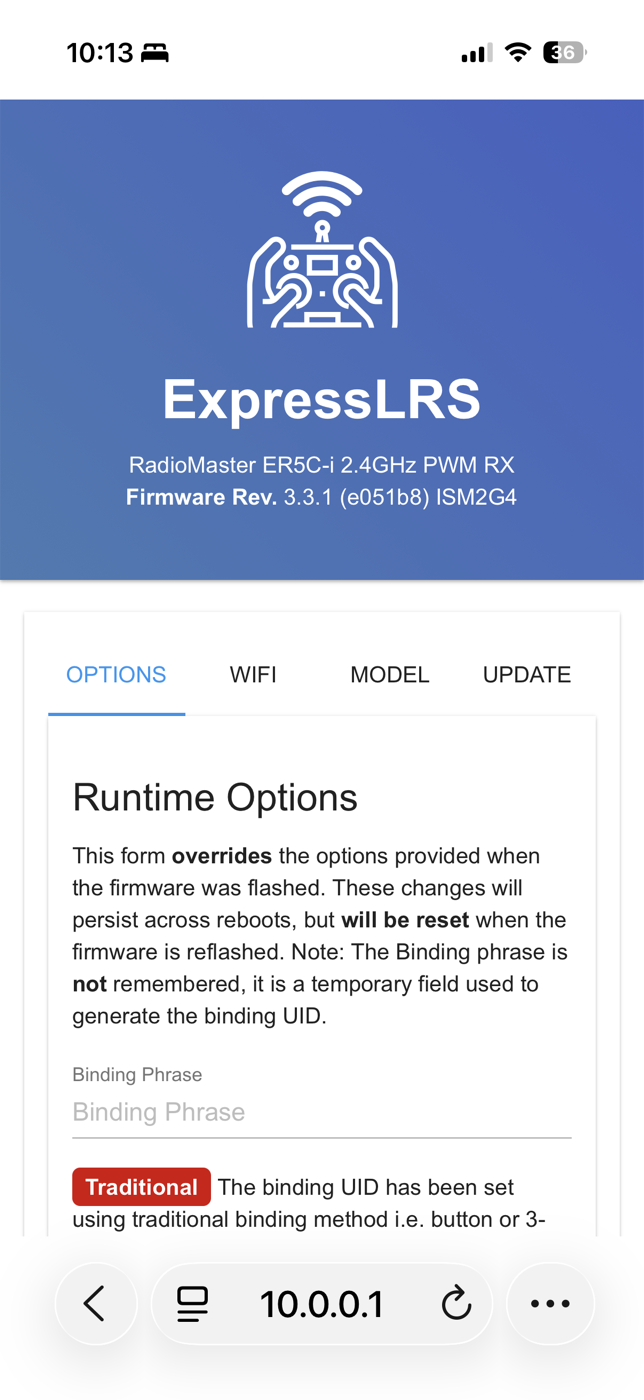
<h3>What the page should look like</h3>
<p><img src="/assets/robo-log2/troubleshooting/elrs-webui-landing.png" alt="ExpressLRS web UI in Safari: blue header reading RadioMaster ER5C-i 2.4GHz PWM RX, Firmware Rev 3.3.1, and four tabs OPTIONS WIFI MODEL UPDATE"></p>
<p><em>Correct page. Four tabs: <strong>OPTIONS · WIFI · MODEL · UPDATE</strong>. Serial output lives under MODEL.</em></p>
<h3>🔴 Serial TX is only offered on ONE output row</h3>
<p>This is the thing that cost the most time. The receiver's own help text says <em>&quot;Serial (for MCU
pins 1 and 3 only)&quot;</em> — <strong>that is internal MCU numbering, not the output numbers in the table.</strong>
Going by it sends you to the wrong row, where the Mode dropdown simply ends at <code>On/Off</code> and you
conclude the firmware doesn't support serial.</p>
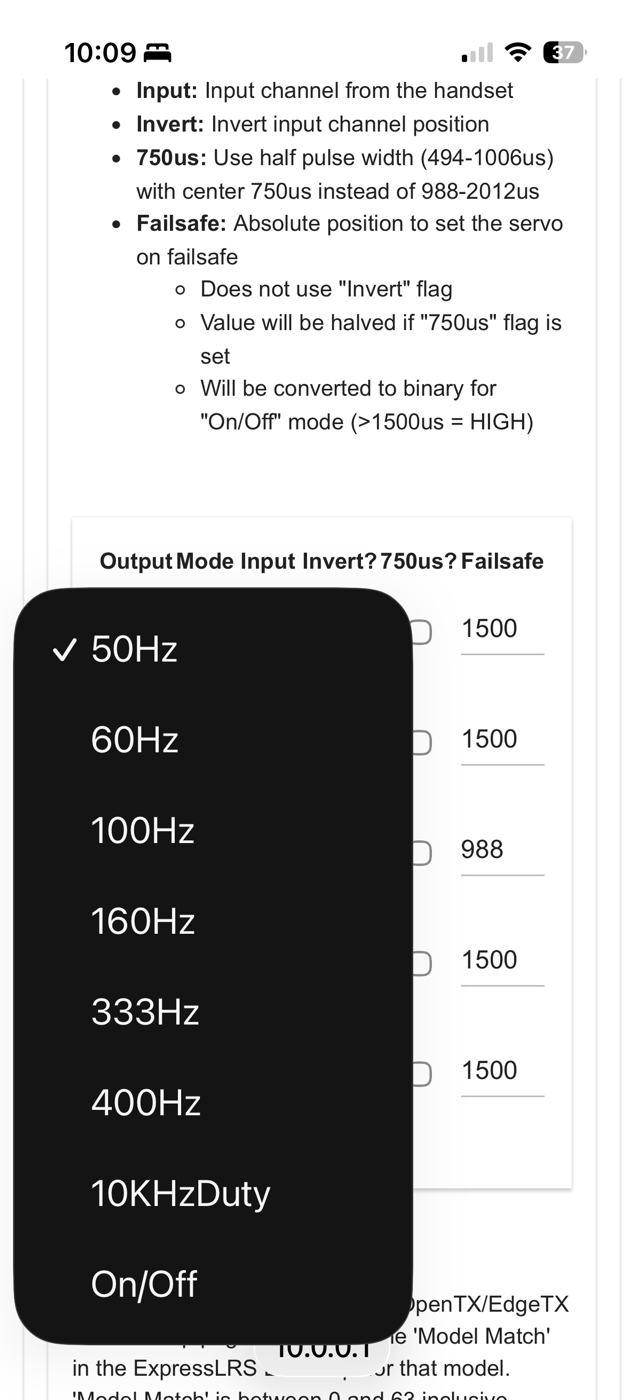
<p><img src="/assets/robo-log2/troubleshooting/elrs-mode-dropdown-row1-no-serial.png" alt="Mode dropdown on output row 1 listing 50Hz through 400Hz, 10KHzDuty and On/Off, with no Serial option"></p>
<p><em>Row 1's Mode dropdown. Ends at <code>On/Off</code>. No serial — and nothing tells you why.</em></p>
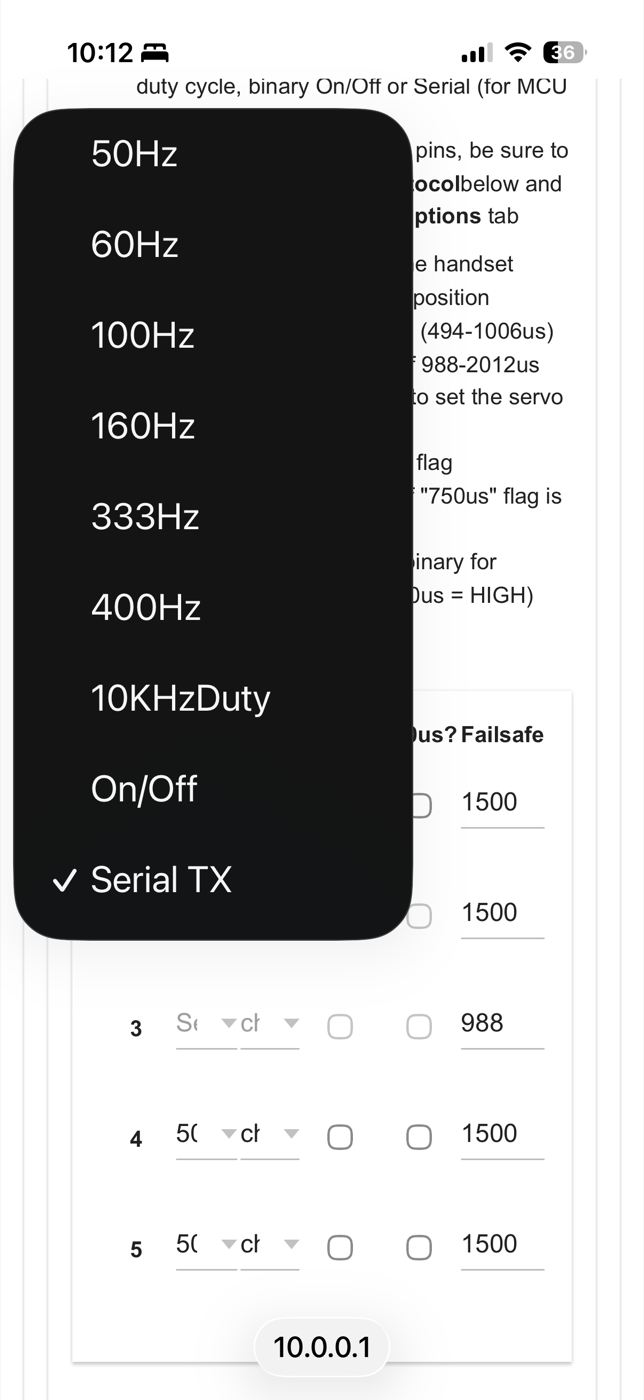
<p><strong>On the ER3Ci / ER4 / ER5 series, it is output 2.</strong> Set <strong>output 2 → <code>Serial TX</code></strong> and output 3
becomes Serial RX automatically. <strong>[reported]</strong>: <a href="https://oscarliang.com/crsf-sbus-expresslrs-pwm-receivers/">Oscar Liang</a>,
confirmed <strong>[measured]</strong> on our own ER5C-i.</p>
<p><img src="/assets/robo-log2/troubleshooting/elrs-mode-dropdown-row2-serial-tx.png" alt="Mode dropdown on output row 2 showing the same list plus Serial TX at the bottom, checked"></p>
<p><em>Row 2's dropdown. Identical list <strong>plus <code>Serial TX</code></strong>, and row 3 has already greyed itself out
as the paired Serial RX.</em></p>
<h3>Then</h3>
<ol>
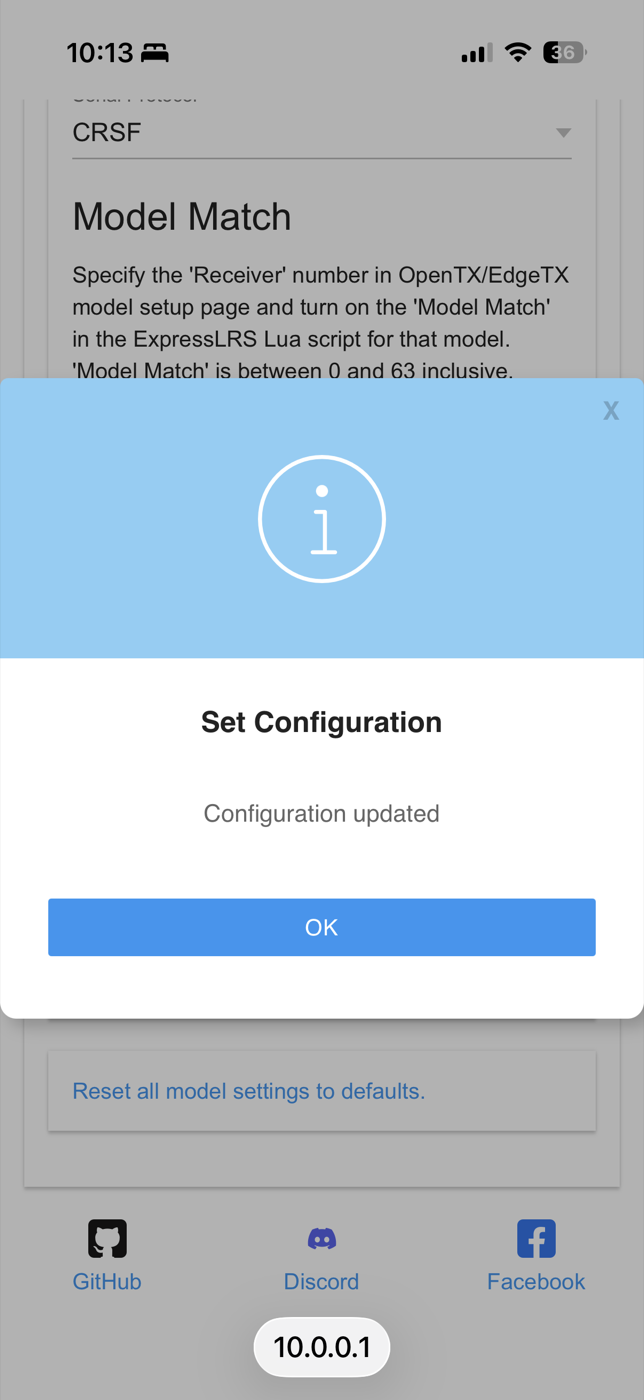
<li><strong>Serial Protocol</strong>: appears below the output table only <em>after</em> a pin is set to Serial TX,
which is why you can't find it beforehand. Set it to <strong>CRSF</strong>.</li>
<li><strong>SAVE.</strong> You want &quot;Configuration updated.&quot;</li>
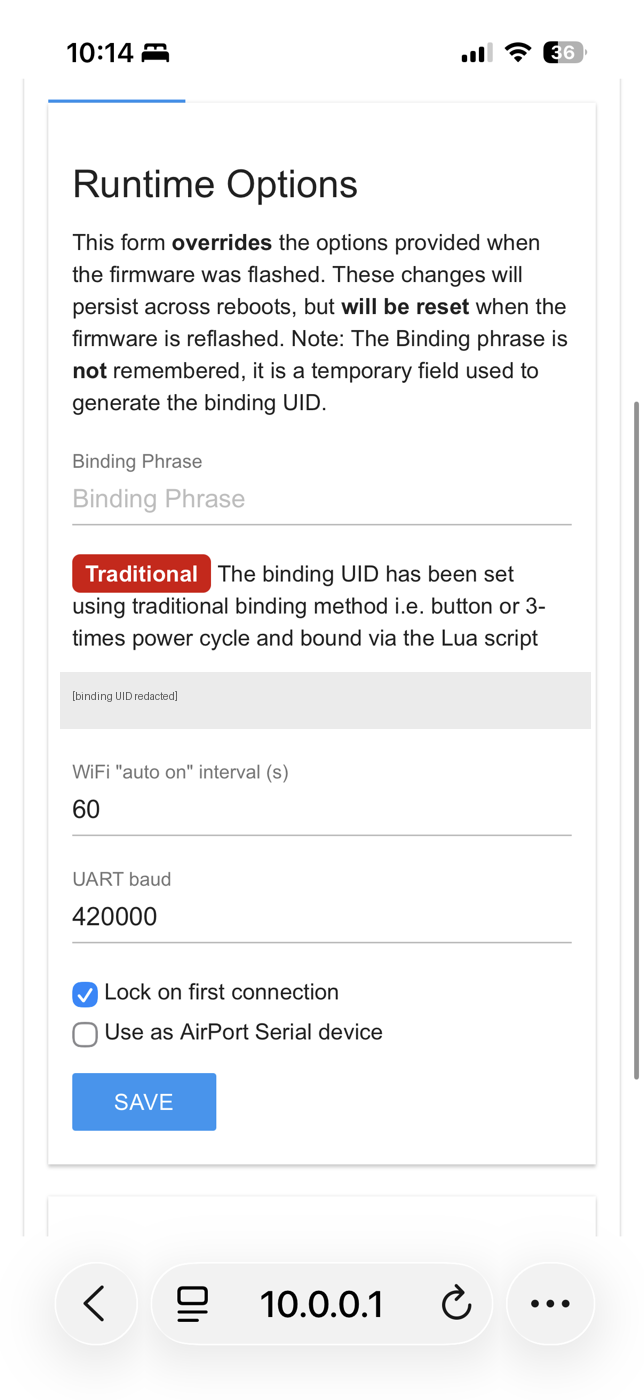
<li><strong>UART baud</strong> on the OPTIONS tab. <strong>It already read 420000 for us.</strong> Check before changing.</li>
</ol>
<p><img src="/assets/robo-log2/troubleshooting/elrs-configuration-updated-crsf.png" alt="ExpressLRS Set Configuration dialog reading Configuration updated, with Serial Protocol CRSF visible behind it"></p>
<p><em>What success looks like, with <code>Serial Protocol: CRSF</code> visible behind the dialog.</em></p>
<p><img src="/assets/robo-log2/troubleshooting/elrs-options-uart-baud.png" alt="ExpressLRS Runtime Options showing the binding UID field (redacted), WiFi auto-on interval 60, and UART baud 420000"></p>
<p><em>OPTIONS tab. <strong>UART baud 420000 is the CRSF default</strong> — likely nothing to change.</em></p>
<p><strong>Leave the Binding Phrase field EMPTY.</strong> If the page says the UID was set by the traditional
method, typing a phrase generates a new UID and <strong>breaks the bind you already have.</strong></p>
<h3>What you lose, and it is expected</h3>
<p>Output 2 stops being a servo output the moment it becomes serial. If your ESC was on it, <strong>the
throttle goes dead at the vehicle while still showing movement on the transmitter's channel
monitor</strong>: the radio is transmitting fine; the receiver pin changed job. Throttle comes back
through the flight controller. Any PWM outputs you didn't touch keep working.</p>
<hr>
<h2>2 · 🔴 ArduPilot's companion-computer failsafe is off by default, and fails silently</h2>
<p><strong>This is the most dangerous thing in this document.</strong> If your companion computer is sending
guidance commands and it dies, you may have no failsafe at all, and nothing will tell you.</p>
<p>Three defaults combine:</p>
<ul>
<li><code>FS_GCS_ENABLE</code> defaults to <strong>0</strong>: the failsafe is disabled</li>
<li>MAVROS's <code>system_id</code> defaults to <strong>1</strong>, while ArduPilot expects <strong>255</strong></li>
<li>Rover's <code>gcs_failsafe_check()</code> <strong>returns early if it has never seen a qualifying heartbeat</strong>,
so a failsafe that was never armed never fires</li>
</ul>
<p><strong>[measured]</strong> against ArduPilot source and MAVROS defaults.</p>
<p>Minimum working configuration:</p>
<pre><code>MAV_GCS_SYSID   255     # named SYSID_MYGCS on Rover &lt;= 4.6
FS_GCS_ENABLE   1
FS_GCS_TIMEOUT  2
FS_TIMEOUT      1
FS_ACTION       2       # Hold
GUID_TIMEOUT    0.5
FS_THR_ENABLE   0       # only if no RC receiver is bound
</code></pre>
<p>plus MAVROS <code>system_id: 255</code>.</p>
<p><strong>Verify by breaking it, not by reading parameters.</strong> Pull the companion computer's power in the
middle of a command and watch the vehicle go to Hold. <strong>If you cannot make it fail on demand, you
do not have a failsafe</strong> — you have a parameter list.</p>
<hr>
<h2>3 · ROS 2 on a Jetson</h2>
<h3>MAVROS below 2.15.1 is broken on Humble</h3>
<p>Latched publishers broke on Humble and were fixed inside the 2.15.0 cycle. Below that, topics
including <code>~/state</code> never publish, which presents as a bridge that connects and then does nothing.
<strong>Require ≥ 2.15.1.</strong> 2.15.1 also fixed duplicated launch namespaces, whose symptom is topics
appearing at <code>/mavros/mavros/...</code>. <strong>[measured]</strong> against the MAVROS changelog.</p>
<h3>The MAVROS node exits immediately</h3>
<p><strong>GeographicLib datasets are mandatory, not optional</strong>: the node shuts itself down without them,
which reads like a crash.</p>
<pre><code>sudo ros2 run mavros install_geographiclib_datasets.sh
</code></pre>
<p><strong>[measured]</strong></p>
<h3>Discovery is flaky on a Jetson specifically</h3>
<p>Two things, both cheap:</p>
<ul>
<li><strong>Use CycloneDDS</strong>: <code>export RMW_IMPLEMENTATION=rmw_cyclonedds_cpp</code>. This is field consensus
rather than official guidance <strong>[reported]</strong>, but MAVROS's own 2.15.0 changelog cites FastDDS
shared-memory and teardown hangs <strong>[measured]</strong>.</li>
<li><strong>Pin <code>ROS_DOMAIN_ID</code>.</strong> A Jetson typically has both WiFi and a USB-gadget interface up, and
multicast discovery gets confused across them. <strong>[estimate]</strong>: reasoned from the interface
layout, not isolated experimentally.</li>
</ul>
<hr>
<h2>4 · JetPack and the Jetson itself</h2>
<h3>Your working setup breaks after an unattended upgrade</h3>
<p>Ubuntu's automatic updates break JetPack compatibility. <strong>Disable unattended-upgrades and
<code>apt-mark hold</code> the NVIDIA/L4T packages before it matters</strong>, not after. <strong>[reported]</strong>: widely
reported on the Jetson forums, and hit here too.</p>
<h3><code>nvv4l2decoder</code> fails and <code>/dev/nvhost-nvdec*</code> doesn't exist</h3>
<p>The device nodes being absent is <strong>not</strong> the cause. We measured <code>nvv4l2decoder</code> working on
JetPack 6.2.1 with those nodes absent, on an Orin Nano Super 8 GB. If you're chasing missing
device nodes, you're chasing the wrong thing; NVIDIA's own guidance for the related reports points
at the GStreamer registry cache (<code>rm ~/.cache/gstreamer-1.0/registry.aarch64.bin</code>, install
<code>nvidia-l4t-gstreamer</code>). <strong>[measured]</strong>: written up in full at
<a href="https://forums.developer.nvidia.com/t/nvv4l2decoder-works-on-jetpack-6-2-1-with-dev-nvhost-nvdec-absent-orin-nano-super-8-gb/382387">NVIDIA forums topic 382387</a>.</p>
<h3>Don't commit TensorRT engines</h3>
<p>Engines are keyed to SM architecture <strong>and</strong> TensorRT/CUDA version, so a checked-in <code>.engine</code> is
portable to exactly one machine. Commit <strong>ONNX plus a deterministic builder script plus the
calibration cache</strong> instead. <strong>[measured]</strong></p>
<h3>FP16 gains nothing under TensorRT on an Orin ViT — but 3.4× in plain PyTorch</h3>
<p>On Vision Transformers specifically, we found FP16 gives roughly <strong>0%</strong> speedup under TensorRT on
Orin: the ONNX exporter never emits a multi-head-attention pattern for TensorRT to fuse. In eager
PyTorch the same precision change is a different story: <strong>3.4× faster</strong> (18.9 ms vs 63.7 ms per
batch) at no measurable accuracy cost for us. <strong>Measure your own path before assuming either
way.</strong> <strong>[measured]</strong> for both numbers; <strong>[estimate]</strong> for the generalisation beyond the models we
tested.</p>
<hr>
<h2>5 · Streaming an iPhone into a Jetson over USB</h2>
<h3>The phone doesn't enumerate</h3>
<p>Run <code>usbmuxd</code> with <strong><code>--no-preflight</code></strong>. The default preflight step races the iOS trust pairing and
produces the &quot;0 devices found&quot; reports that dominate search results for this problem. <strong>[measured]</strong>
on iOS 26.6 → JetPack 6.2.1.</p>
<h3>Don't do this on Ubuntu 20.04</h3>
<p>Focal ships <code>libimobiledevice</code> linked against GnuTLS, which breaks trust pairing. Use 22.04.
<strong>[measured]</strong></p>
<h3>What we found when we looked for prior art</h3>
<p><strong>[none found]</strong> — and that is the finding, not a gap. The NVIDIA developer forums return five
<code>usbmuxd</code> topics forum-wide, none about iOS video, and zero for <code>libimobiledevice</code>. The
iPhone-on-Jetson space is empty. If you're doing this, you are close to the frontier and should
expect to write the documentation rather than read it.</p>
<h3>Reported failure modes worth knowing about</h3>
<p>Neither reproduced for us, but both are real reports from people doing very similar things:</p>
<ul>
<li><a href="https://github.com/marek-simonik/record3d/issues/72">record3d #72</a>: <em>&quot;variable lag in the video
stream (1-3 seconds)&quot;</em>, filed by a Dobb·E author streaming from an iPhone on a robot over USB,
open since 2023. <strong>[reported]</strong></li>
<li><a href="https://github.com/libimobiledevice/usbmuxd/issues/215">usbmuxd #215</a>: <em>&quot;works fine for a random
amount of minutes, until it dies.&quot;</em> <strong>[reported]</strong></li>
</ul>
<p>We ran <strong>27,000 frames over 30 minutes with zero stalls and zero reconnects</strong> on our own path
(different app, different client), which does not refute either report — it establishes that our
path does not have it. <strong>[measured]</strong>, indoors on a bench; outdoor thermal behaviour is untested.</p>
<hr>
<h2>6 · Capturing data from a phone</h2>
<h3>Recordings come out corrupt</h3>
<p>Video finalization races sharing. We lost video on <strong>6 of 9</strong> recordings in one session and <strong>3 of
8 attempts</strong> in another. A fixed post-stop wait is <strong>not</strong> sufficient: we specified five seconds
and still lost one in six. <strong>The recording appearing in the app's own list is the actual finalize
signal; wait for that event, not a timer.</strong> <strong>[measured]</strong></p>
<p>A truncated MP4 is partially recoverable by rebuilding annex-B HEVC from <code>mdat</code> using headers from
a known-good clip from the same app — but we could not prove frame alignment to single-frame
precision, and shipped nothing that depended on it. <strong>[measured]</strong> mechanically; alignment
<strong>[none found]</strong>.</p>
<h3>ARKit pose dies within a minute on a moving vehicle</h3>
<p>Visual-inertial odometry on a phone is not rated for vehicles. Every session on one device died in
19–47 seconds. What fixed it was <strong>speed discipline, not weather</strong>: a newer phone, 5 fps capture,
and keeping p95 speed at or below ~5 m/s gave clean full-session pose across six consecutive
outdoor runs, validated by loop-closure error of 1.6–6.0 m over 465–636 m of driving. <strong>[measured]</strong></p>
<h3>Check what your &quot;frame rate&quot; actually is</h3>
<p>Ours was <strong>decimation</strong>, not capture rate: ARKit ran at 59.976 Hz and the app kept every twelfth
frame. That matters because every thermal event we had recorded happened with the sensor at full
rate, so conclusions about &quot;5 fps is sustainable&quot; were about a much heavier load than they
appeared to be. <strong>Verify against your own timestamps.</strong> <strong>[measured]</strong></p>
<hr>
<h2>7 · Self-supervised labelling pipelines</h2>
<h3>Don't use the centre pixel's depth to locate an event</h3>
<p>If the object isn't centred, the centre pixel reads the floor beside it and mislocates the label by
roughly a metre. Use the <strong>nearest above-floor cluster</strong> instead. <strong>[measured]</strong></p>
<h3>A suspiciously good score is a bug report</h3>
<p>We hit <strong>AUC 0.998</strong> (obstacle model, Log #1) on geometry that was broken, twice. The number was the warning; what caught it
both times was <strong>looking at the overlays</strong>. If you have a self-supervised label chain, your metric
measures agreement with your labeller, not with the world — so build the visual check first and
trust it over the score. <strong>[measured]</strong></p>
<hr>
<h2>Contributing</h2>
<p>If you hit something on this list and our fix didn't work, or you hit something that isn't here,
send it with <strong>exact versions, exact commands and exact output</strong>: reply on the post, or email
captaincolinr@gmail.com until the code release opens a public tracker. That is the same standard
we hold ourselves to when reporting upstream, and it is the difference between a report someone
can act on and one they can only sympathise with.</p>
]]></content>
	</entry>
	<entry>
		<title>I rearranged my kitchen to fool my robot. It found the truck anyway</title>
		<link href="https://vaguebutexciting.dev/posts/kitchen-robot-eyes-log1/"/>
		<id>https://vaguebutexciting.dev/posts/kitchen-robot-eyes-log1/</id>
		<updated>2026-08-31T00:00:00.000Z</updated>
		<summary>30 bumps of a phone became 147,731 training labels, a 385-parameter model, and an honest experiment. Expensive sensors teach, cheap sensors ship: LiDAR + ARKit + accelerometer label the data; the model that ships sees only RGB.</summary>
		<content type="html"><![CDATA[<p><em>30 bumps of a phone became 147,731 training labels, a 385-parameter model, and an
honest experiment.</em></p>
<div style="position:relative;padding-bottom:56.25%;height:0;overflow:hidden;margin:1.5em 0">
<iframe src="https://www.youtube-nocookie.com/embed/4TfdhlGQR4A" title="I rearranged my kitchen to fool my robot — it found the truck anyway" style="position:absolute;top:0;left:0;width:100%;height:100%;border:0" allowfullscreen loading="lazy"></iframe>
</div>
<p>The idea: <em>expensive sensors teach, cheap sensors ship.</em> During training, an iPhone's
LiDAR, ARKit pose tracking, and accelerometer do all the labeling work. The model that
comes out consumes none of them — RGB images are its only runtime input. The first truck
prototype still carries the whole phone (it provides the camera and the compute); what's
being tested is whether plain camera images are the only perception signal the finished
model actually requires.</p>
<p>I've shipped this pattern before. I spent twenty months building a running-gait system
where an expensive camera rig generated the labels that trained a watch model — and the
watch shipped without the camera. This project is that pattern, made visible.</p>
<h2>How the labels happen</h2>
<p>I walk the room for a few minutes. When I'm at arm's length from something the truck
shouldn't hit, I bump the phone body with my free hand — the phone never touches the
obstacle. Walking never exceeds about 0.6 g of accelerometer deviation (g as in units of
Earth's gravity); bumps land at 1.6–4.7 g, so detection is a threshold. The
accelerometer identifies <em>when</em> a bump occurred, LiDAR identifies the nearby obstacle in
3-D, and ARKit projects that location back into every earlier frame that saw it on
approach — those patches are labeled &quot;no-go.&quot; Floor I walk over seconds later labels
itself &quot;go.&quot; Thirty bumps became 147,731 labeled image patches. No manual image
labeling — nobody draws a box.</p>
<p>The model is deliberately tiny: frozen DINOv2 image features feed a logistic-regression
head with 385 trained parameters. It retrains locally in about two minutes. Model size
doesn't make an evaluation trustworthy by itself, so the experiments use held-out time
blocks and pass/fail gates defined before training.</p>
<h2>The gate, then the experiment</h2>
<p>Before training, I wrote down a pass/fail gate with two separate conditions: at least
0.85 AUC against LiDAR-assisted labels on held-out time blocks, AND heatmap overlays
that visibly outline the obstacles. A good score doesn't prove a good picture. The first
session — a 3.5-minute walk, 21 bumps — passed both: <strong>0.932</strong>, and you could see the
obstacles in the heat.</p>
<p>Same-session held-out is the easiest honest test there is. So when the kitchen got
rearranged, I treated it as a free experiment — and evaluated the old model on the new
room <strong>before</strong> retraining anything. What changed: the parked RC truck moved to a new
spot; a battery and charger were removed; a 3D-printed plastic hand appeared (made for
last Halloween; never seen, never bumped); a stool and a drone case stayed put.</p>
<p>Results, old model on the new room: the heatmap outlined the truck at its new location —
it found the truck, not the truck's old spot — and showed no comparable response in the
empty space where the battery and charger had been. Then I re-ran the whole loop in the
new room: 30 bumps, ~2 minutes of training → <strong>AUC 0.9403</strong> on that recording's held-out
labels. The old model on those <strong>same held-out labels</strong>: <strong>0.9224</strong> — a 1.8-point gap on
identical test data, for a model that had never seen this arrangement. (0.932 and 0.9224
come from different recordings, so I'm not attributing their difference to the
rearrangement alone.)</p>
<p>Why test like this at all? An earlier wrist-IMU model from my running project dropped 21
percentage points in a matched test on another day — different task, different metric,
so the numbers aren't comparable; together, though, those two experiments are why I now
test every system under changed conditions instead of trusting a single held-out score.</p>
<h2>The useful failure</h2>
<p>The 3D-printed hand is the best part. Under the old model it produced a strong response
nearby but only a faint one from across the room: predicted no-go probability <strong>0.19</strong>,
in a frame whose median was 0.00. After retraining with bumps that included the hand,
the same distant viewpoint — measured on a separate no-bump walk — reads <strong>1.00</strong>, in a
frame whose median is 0.16. The retrained model runs hotter overall, so the margin over
the median is the result — and it's one object at one viewpoint, not a generalization
claim. But that's the loop: new dangers need new bumps — and the bumps work.</p>
<h2>Honest limits</h2>
<p>Not tested yet, and therefore not claimed: the truck's ~15 cm camera viewpoint (all data
is hand-held so far), another building, another operator, dynamic obstacles, closed-loop
control. One person, one home, real measurements. Goal for November: phone mounted on
the truck (the mount is real — it's in the video's first seconds), the danger overlay
on-device, and driver assistance — a camera-only model flags danger while a human
drives. If testing supports it, the next step is shared autonomy, with the human keeping
immediate override.</p>
<p>Lineage: BADGR (UC Berkeley) and Wild Visual Navigation (ETH Zürich), shrunk to
consumer hardware. Every number above traces to a dated findings ledger.</p>
<p>Next log: the truck goes outside.</p>
<p><em>Video: <a href="https://youtu.be/4TfdhlGQR4A">youtu.be/4TfdhlGQR4A</a> · Full build log with receipts: coming to Hackaday.io — link will land here.</em></p>
]]></content>
	</entry>
	<entry>
		<title>73% of a slow video render was cv2.VideoCapture seeking — a frame cache cut it 443s→69s</title>
		<link href="https://vaguebutexciting.dev/posts/cv2-seek-thrashing-render-fix/"/>
		<id>https://vaguebutexciting.dev/posts/cv2-seek-thrashing-render-fix/</id>
		<updated>2026-08-28T00:00:00.000Z</updated>
		<summary>Profiling a multi-segment OpenCV video renderer: cv2.VideoCapture.set(CAP_PROP_POS_FRAMES) is not O(1) — it decodes forward from the nearest keyframe. Decode once into a memory-guarded frame cache; output byte-identical (same md5), 6.4x faster.</summary>
		<content type="html"><![CDATA[<p>A composed &quot;highlights&quot; video in my gait-analysis pipeline — eight segments plus
section cards, built from one source clip — took <strong>443 seconds</strong> to render on a
cloud GPU worker. A 4K clip took 63 minutes. The app timed out; the render pool
starved. The obvious suspects were the drawing code (lots of cv2/numpy overlay
work) and the software encode.</p>
<p>Both innocent. <code>cProfile</code> said <strong>73% of wall-clock was
<code>cv2.VideoCapture.set(CAP_PROP_POS_FRAMES)</code></strong> — seeking the source video.</p>
<h2>Why seeking dominated</h2>
<p>The composer builds ~8 segments, each revisiting <em>different, overlapping frame
ranges out of order</em>. Frame access went through a small LRU cache (60 frames);
on a miss it did:</p>
<pre><code class="language-python">cap.set(cv2.CAP_PROP_POS_FRAMES, idx)
ok, img = cap.read()
</code></pre>
<p>The trap: <strong><code>VideoCapture.set(CAP_PROP_POS_FRAMES)</code> is not O(1).</strong> Video is
inter-frame compressed, so OpenCV decodes forward from the nearest keyframe on
every seek. For a 600-frame clip accessed out of order across 8 segments, the
60-frame cache thrashed — nearly every access re-seeked. Measured locally:
~1,251 seeks × ~61 ms ≈ 76 s of a 104 s render, pure seeking. Drawing was ~10%;
encoding ~11%. The render was never the bottleneck — frame I/O was.</p>
<h2>The fix: decode once, sequentially, into memory</h2>
<p>Read the whole clip front-to-back one time into a dict keyed by frame index;
<code>frame(idx)</code> becomes a memory lookup. Guard against huge clips so a long or 4K
source can't OOM the container:</p>
<pre><code class="language-python">def _predecode(self):
    self._decoded = True
    nframes = int(self.cap.get(cv2.CAP_PROP_FRAME_COUNT) or 0)
    if nframes &lt;= 0 or nframes * self.W * self.H * 3 &gt; 6 * 1024**3:
        return  # too big — keep the per-access seek fallback
    self.cap.set(cv2.CAP_PROP_POS_FRAMES, 0)
    i = 0
    while True:
        ok, img = self.cap.read()
        if not ok:
            break
        if img.shape[1] != self.W:
            img = cv2.resize(img, (self.W, self.H))
        self._cache[i] = img
        i += 1
</code></pre>
<p>Sequential decode is what video codecs are optimized for; you pay the decode
cost exactly once.</p>
<h2>Results (measured)</h2>
<table>
<thead>
<tr>
<th></th>
<th>before</th>
<th>after</th>
<th>output</th>
</tr>
</thead>
<tbody>
<tr>
<td>local, 1080p/236 frames</td>
<td>104 s</td>
<td><strong>26 s</strong></td>
<td>md5 identical</td>
</tr>
<tr>
<td>cloud, 1080p/600 frames</td>
<td>443 s</td>
<td><strong>69 s</strong></td>
<td>correct composite</td>
</tr>
</tbody>
</table>
<p>Byte-identical output (same md5) — a pure speedup, which also made it safe to
ship without re-validating the video content.</p>
<h2>The check most optimizations skip: does the rest of the pipeline have this bug?</h2>
<p>No — and knowing <em>why</em> is the useful part. The main renderer reads frames
<strong>sequentially</strong> (<code>cap.read()</code> in a loop, no seeking), so it was already fine.
One other <code>POS_FRAMES</code> use grabs ~3 frames per event — bounded, ~1 s. The thrash
was unique to the one component with an <strong>out-of-order, multi-segment access
pattern</strong>. The fix stayed scoped to that file, and nothing else needed touching.</p>
<h2>Limits</h2>
<ul>
<li>Cost still scales with source pixels: the renderer draws on full-res frames
even though the output canvas is small. A 4K source is ~63 minutes and should
be downscaled before rendering (that change touches pose-coordinate scaling,
so it carries correctness risk and wasn't done). Our capture path emits 1080p,
and the memory guard degrades gracefully, so production is safe as-is.</li>
<li>The 6 GiB guard is sized for a 16 GiB container; scale to yours.</li>
</ul>
<h2>The transferable rule</h2>
<p>For any renderer that revisits frames out of order: <strong>decode once into a cache;
never random-seek per frame.</strong> And before optimizing a slow multi-pass renderer,
profile — <code>python -m cProfile -o out.prof …</code> then sort by cumulative — because
the plausible bottleneck (drawing, encoding) and the actual one (I/O) are
routinely different, and one run of the profiler settles it.</p>
]]></content>
	</entry>
	<entry>
		<title>Headless App Store submission, run end-to-end by a coding agent</title>
		<link href="https://vaguebutexciting.dev/posts/agentic-app-store-submission/"/>
		<id>https://vaguebutexciting.dev/posts/agentic-app-store-submission/</id>
		<updated>2026-07-21T00:00:00.000Z</updated>
		<summary>The full App Store Connect API recipe a coding agent used to submit an iOS release unattended — build upload, screenshot API, review submission, state verification — and the runbook of prior failures that made it work.</summary>
		<content type="html"><![CDATA[<p>At 00:01 UTC on July 11, 2026, a review submission for my iOS app — Run Fun: See Yourself, v2.0.0 — flipped to <code>WAITING_FOR_REVIEW</code> in App Store Connect. I didn't click Submit. A coding agent (Claude Code) did the whole final mile through the App Store Connect API: deleted stale screenshots and uploaded new ones, attached the processed build, created the review submission, submitted it, and then verified the state by reading it back. The app had existed as a concept for about 48 hours — a pivot cut from a much larger app — and it went from decision to &quot;waiting for review&quot; in those same 48 hours, with the agent doing the overwhelming majority of the work.</p>
<p>If you stop reading there, the takeaway is &quot;AI agents can ship iOS apps now.&quot; That takeaway is wrong in an important way, and the wrongness is the useful part.</p>
<p>Here's the claim I actually believe, and the evidence for it: <strong>the agent executed, in one night, a recipe that my failures had spent months writing.</strong> Nothing about that night was improvised. Every step the agent took either followed a runbook that a previous failure had paid for, or hit a brand-new failure — and the new ones are now in the runbook too.</p>
<h2>What the agent actually did that night</h2>
<p>The condensed flow, for people who came for the recipe (all raw App Store Connect API — fastlane turned out to be a dead end on my machine, more on that below):</p>
<ol>
<li><strong>Build &amp; upload:</strong> bump <code>CURRENT_PROJECT_VERSION</code>, <code>xcodebuild archive</code> → <code>-exportArchive</code> with an export-only options plist (<code>method=app-store-connect</code>, no <code>destination</code>) → upload the IPA with <code>xcrun altool --upload-app</code> using an ASC API key. 163 MB, 12-second transfer.</li>
<li><strong>Wait properly:</strong> poll <code>GET /v1/builds?filter[app]=…&amp;sort=-uploadedDate</code> until <code>processingState=VALID</code>. Not &quot;wait a bit and hope&quot; — poll for the actual state.</li>
<li><strong>Screenshots via API:</strong> for each image — delete the stale <code>appScreenshots</code> in the display set, <code>POST /v1/appScreenshots</code> to reserve upload operations, PUT the bytes, <code>PATCH uploaded=true</code> with an md5 <code>sourceFileChecksum</code>, then poll <code>assetDeliveryState</code> until <code>COMPLETE</code>.</li>
<li><strong>Attach the build</strong> to the version record, patch reviewer notes, keep <code>releaseType=MANUAL</code>.</li>
<li><strong>Submit:</strong> <code>POST /v1/reviewSubmissions</code> → <code>POST /v1/reviewSubmissionItems</code> linking the <strong><code>appStoreVersion</code></strong> relationship — <em>not</em> <code>appStoreVersionForReview</code>, which 409s — then <code>PATCH {&quot;attributes&quot;:{&quot;submitted&quot;:true}}</code>.</li>
<li><strong>Verify:</strong> read back the version and the review queue; both said <code>WAITING_FOR_REVIEW</code>. Only then report done.</li>
</ol>
<p>Two things went wrong that night, which is exactly the point. First: we'd deleted the Apple Watch screenshot set, reasoning that v2.0 has no user-facing Watch surface. ASC rejected the review submission item with <code>SCREENSHOT_REQUIRED.APP_WATCH_SERIES_4</code> — because the binary still <em>ships</em> a dormant, flag-gated Watch app, and if the binary ships it, the listing needs its screenshots. The agent recovered the previous version's Watch images through each localization's old screenshot set (<code>imageAsset.templateUrl</code>, fill in <code>{w}x{h}bb.{f}</code>) and re-uploaded them. Second: one of the new iPhone screenshots came back black — a staged camera capture the agent couldn't retake, because a camera pointed at nothing is one of the few things an agent genuinely cannot fake. We shipped three good screenshots and deferred the hero shot to a metadata update.</p>
<p>Both failures are now permanent lines in the runbook. That's the loop this whole post is about.</p>
<h2>The staircase this stood on</h2>
<p>Here is what that one night actually consumed, with dates. I went back through the repo's own records to check my memory, because &quot;I couldn't have done this cold&quot; is exactly the kind of claim people flatter themselves with.</p>
<p><strong>May 26 — the first submission took ~7 hours, by hand.</strong> Four build cycles, two screenshot redos, a privacy-declaration expansion. It produced a 12-item gotcha list that reads like a hazing ritual: screenshots must be <em>exactly</em> 1284×2778 (a native iPhone 17 Pro screenshot is 1206×2622 — &quot;close&quot; is a rejection); macOS screenshots carry an alpha channel that ASC rejects, and <code>sips</code> <em>silently fails</em> to strip it while PIL and ImageMagick work; the listing's &quot;Requires iOS X&quot; line is derived from the binary's deployment target, not your marketing copy; every data type you declare in App Privacy must appear, by Apple's exact name, in your privacy policy, because the reviewer reads both and matches them.</p>
<p><strong>June 21 — credential archaeology.</strong> A headless upload needs an ASC API key. The <code>.p8</code> had been created back in September 2025 and later removed from the repo; the working copy was recovered from a git blob in the repo's history, validated with openssl, and stored properly. The same session proved the &quot;normal&quot; path — uploading through the signed-in Xcode account — is flaky from a headless CLI context (Xcode 26's account layer can't reliably be reached from a spawned <code>xcodebuild</code>), which is <em>why</em> the API-key path matters. fastlane was also a dead end on this machine (system Ruby, no bundler). Every one of those dead ends cost real hours, once.</p>
<p><strong>June 25–26 — the recipe gets validated on a real release.</strong> Issuer ID resolved, device registration via <code>POST /v1/devices</code> proven (the CLI's <code>-allowProvisioningUpdates</code> does <em>not</em> register unknown devices, another thing you learn exactly once), and then v1.5.7 shipped through the full headless path: archive → export → altool → poll → attach → submit. A pre-submission audit that same day caught a genuine rejection blocker — a feature that had drifted out of its internal-build gate and contradicted a note we'd previously given Apple's reviewers.</p>
<p><strong>July 4 — the release-order trap.</strong> A marketing version closes for TestFlight beta review the moment it's released on the App Store (<code>ENTITY_UNPROCESSABLE.CLOSED_VERSION</code>). Learned on v1.5.8, encoded as &quot;do not click Release until beta review clears.&quot; This is why the agent left <code>releaseType=MANUAL</code> and why the human keeps the Release click.</p>
<p><strong>And under all of that: the app itself.</strong> The &quot;48-hour&quot; v2.0.0 was a carve-out from an app that took 18 months to build — the capture flow, the cloud GPU rendering pipeline it calls (already deployed, already canary-tested), the build system, the signing setup, the device-automation harness the agent used to screenshot its own UI changes on a physical iPhone. The velocity of the last 48 hours was almost entirely stored potential energy.</p>
<h2>The part that isn't about Apple at all</h2>
<p>There's a second dependency that's easy to miss because it doesn't live in any runbook: <strong>knowing when to believe the agent.</strong></p>
<p>Agents report success with the same fluent confidence whether or not the thing succeeded. Early on, I got burned by this repeatedly — &quot;done and verified&quot; claims where the verification was the agent's own optimism. The discipline that fixed it is boring and absolute: <em>verify the effect against an independent signal, never the self-report.</em> It's baked into the submission runbook in small, specific ways: don't trust the upload script's exit code (a trailing <code>tee</code> masks altool's real status — look for <code>UPLOAD SUCCEEDED</code> and a Delivery UUID); don't trust &quot;submitted&quot; until the API reads back <code>WAITING_FOR_REVIEW</code>; don't trust a config change until the serving system proves it changed.</p>
<p>That discipline is <em>why</em> the agent could run for hours without me watching. Not because it doesn't fail — it failed twice that night — but because the process doesn't let a failure masquerade as a success. It took months of being burned to internalize that, and I don't think there's a shortcut. If you hand an agent a task you've never done yourself, you have no independent signal to check it against, and you've built an unsupervised liar with API access.</p>
<h2>What the human still did</h2>
<p>Worth being precise about, since &quot;end-to-end&quot; invites exaggeration. I decided what the app was and what got cut. I reviewed the store description and What's New before they went up. I confirmed the privacy labels in the ASC web UI — there is <em>no</em> official API path for privacy labels (the endpoints 404 with a valid key; the one tool that automates them rides a private Apple-ID session API). I kept the Release click. And I was the reason there was anything to submit: the judgment calls about what a two-day pivot should contain came from 18 months of watching real users hit the previous app.</p>
<h2>The transferable version</h2>
<p>If you want an agent to do some multi-step, high-stakes process for you headlessly, I now believe the path is:</p>
<ol>
<li><strong>Do it by hand first, badly.</strong> The 7-hour version is not wasted time; it's the tuition.</li>
<li><strong>Write down every trap as it bites you</strong>, in a runbook the agent will literally read. Mine says things like &quot;READ IT&quot; at the top, and agents do.</li>
<li><strong>Make verification independent of the agent.</strong> Every step needs a check the agent can't wish into passing: a state read back from the API, a checksum, a serving system's own report.</li>
<li><strong>Keep the irreversible clicks human</strong> until the boring parts have earned trust. <code>releaseType=MANUAL</code> is a philosophy, not a config value.</li>
<li><strong>Feed failures back into the runbook the same night.</strong> The Watch-screenshot 409 is already in mine, so the next agent won't pay for it twice.</li>
</ol>
<p>The headline version of that night — <em>AI ships app in 48 hours</em> — is technically true and deeply misleading. The truthful version is better, I think: an agent turned 18 months of accumulated, written-down, independently-verifiable experience into one night of execution. The leverage is real. It's just not free, and it's not the model — it's the runbook, and the failures that wrote it.</p>
]]></content>
	</entry>
	<entry>
		<title>watchOS 26.5/26.5.1 breaks Watch app installs — the devicectl workaround</title>
		<link href="https://vaguebutexciting.dev/posts/watchos-26-5-install-fix/"/>
		<id>https://vaguebutexciting.dev/posts/watchos-26-5-install-fix/</id>
		<updated>2026-07-21T00:00:00.000Z</updated>
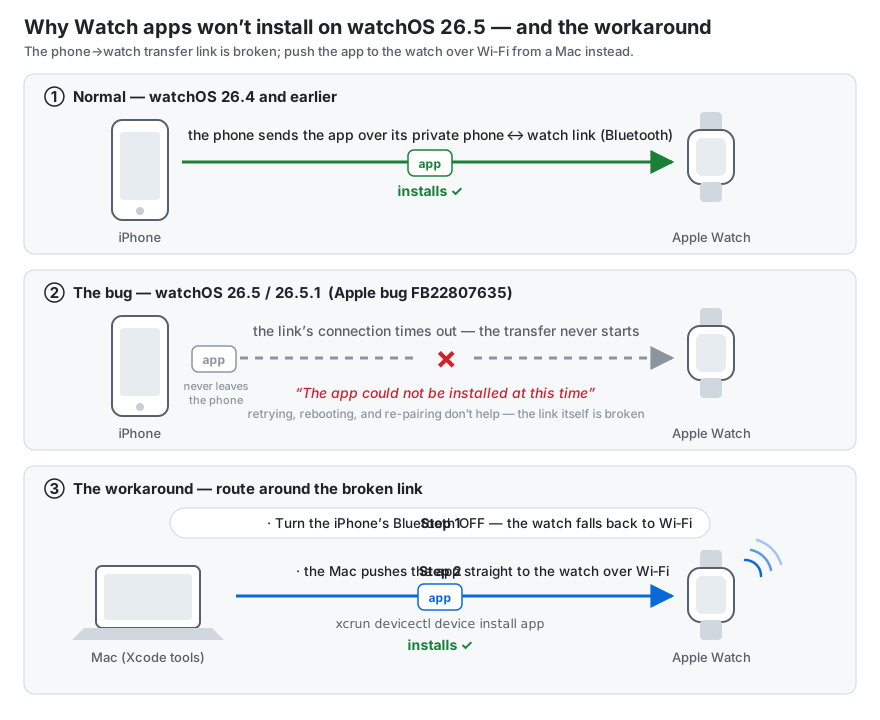
		<summary>Fix for watchOS 26.5/26.5.1 app installs failing with “could not be installed at this time” (ACXError Code=8 “Failed to create socket”, Xcode stuck on “Copying shared cache symbols” 403). Acknowledged Apple regression FB22807635; reproducible workaround: iPhone Bluetooth off + devicectl install over WiFi.</summary>
		<content type="html"><![CDATA[<blockquote>
<p><strong>Update 2026-08-28:</strong> <a href="https://developer.apple.com/news/releases/?id=07272026f">watchOS 26.6 shipped publicly on July 27, 2026</a>. I have not yet re-tested the install path on 26.6, and Apple's release notes don't mention this bug — treat 26.6 as <em>unknown</em>. If you're pinned on 26.5/26.5.1, everything below still applies; if you've tested on 26.6, reporting either way in <a href="https://developer.apple.com/forums/thread/827053">thread 827053</a> helps everyone.</p>
</blockquote>
<p>If your Apple Watch is on <strong>watchOS 26.5 or 26.5.1</strong> and third-party apps won't install — the Watch app on the iPhone spins for about a minute on &quot;Install&quot; and then fails with <em>&quot;could not be installed at this time&quot;</em> — it's not your app, your provisioning, or your pairing. It's an acknowledged Apple regression, and there's a reproducible workaround that doesn't involve waiting for the next watchOS release.</p>
<p>I hit this as a developer trying to get my own dev build onto my watch, but the bug is device-wide: on the same watch, Snapchat and American Airlines failed to install the exact same way. Store apps, TestFlight, enterprise, and dev builds all ride the same broken path.</p>
<h2>The bug</h2>
<p>On watchOS 26.5/26.5.1, installs from the iPhone's Watch app (&quot;Available Apps → Install&quot;, or the &quot;Show App on Apple Watch&quot; toggle) fail after ~1 minute. It worked fine on ≤26.4. Reboots don't help.</p>
<p>You're not alone: <a href="https://developer.apple.com/forums/thread/827053">Developer Forums thread 827053</a> has at least six developers reporting the identical failure across enterprise distribution, dev-provisioned OTA installs, and plain Xcode builds — one with an academic project deadline riding on it. Apple has acknowledged it (feedback <strong>FB22807635</strong>); an Apple engineer replied in June: <em>&quot;it is most likely a regression we have known, and folks are actively working on that.&quot;</em> The underlying failure is the transfer socket timing out:</p>
<pre><code>ACXError Code=8 &quot;Failed to create socket&quot;
identityservices Code=20 &quot;Socket open timed out&quot;
</code></pre>
<p>As of August 4, 2026, no shipped watchOS release is confirmed to fix it. The newest report in the forum thread (late July) reproduces the failure on <strong>watchOS 26.5.2 with iOS 26.5.2</strong>; the 26.6 release candidate went to developers on July 20, and as of this writing nobody in the thread has confirmed the fix either way.</p>
<h2>What's actually breaking (the plain-English version)</h2>
<p>When you tap Install in the iPhone's Watch app, the app doesn't come from the internet to the watch — <strong>the iPhone transfers it to the watch over their private phone↔watch link</strong> (Apple's Identity Services layer, riding Bluetooth). On watchOS 26.5, opening that transfer socket times out — so the install fails after a minute, no matter how many times you retry, reboot, or re-pair. The app never leaves the phone.</p>
<p>That also explains why the workaround works: take Bluetooth away, and the watch falls back to WiFi — where a Mac can hand it the app directly, skipping the broken relay entirely.</p>
<p><img src="/assets/watchos-26-5-install-bug-diagram.svg" alt="How the watchOS 26.5 install bug works, and the workaround"></p>
<h2>What does NOT work (I tried all of it)</h2>
<ul>
<li>Rebooting phone and watch (in every order)</li>
<li>Toggling the app off/on in the iPhone's Watch app</li>
<li>Unpairing and re-pairing the watch (others in the thread also ruled out factory resets and fresh certificates/provisioning profiles)</li>
<li>Toggling Bluetooth off/on on <strong>both</strong> devices — this one is worth trying first, because it <em>has</em> worked for several people in the forum thread. It didn't take for me. If it doesn't for you either, the fix below is the reliable path.</li>
<li>TestFlight instead of a dev build — same phone↔watch transfer path, same failure</li>
</ul>
<p>If you're a developer, Xcode &quot;Run&quot; against the watch also stalls, for a <em>different</em> reason — see below. That combination (store path broken + Xcode path broken) is what makes this bug so disorienting: every install route fails, each with a different symptom.</p>
<h2>The fix that worked (reproducible)</h2>
<p>The trick is to take Bluetooth out of the equation entirely and push the app over the network path instead. The forum thread independently converged on <code>devicectl</code> as the working install route; what follows is the complete recipe — including the two pieces that cost me the most time (<em>why</em> Bluetooth has to be off first, and which of the tooling's status reports to ignore).</p>
<p>One honest caveat: this is a developer workaround. <code>devicectl</code> ships with Xcode, so if you're distributing to enterprise users or testers who don't have a Mac with dev tools, they're stuck with the Bluetooth-toggle lottery until Apple ships the fix. (Non-developers: also try installing from the App Store <em>on the watch itself</em> — that path downloads directly to the watch rather than relaying through the phone. Reported to help for adjacent variants of this failure, though I haven't tested it on 26.5 myself.)</p>
<p><strong>1. Turn the iPhone's Bluetooth OFF.</strong></p>
<p>This forces the watch onto WiFi and lets the Mac↔Watch CoreDevice tunnel come up. Keep Mac, iPhone, and watch on the same real WiFi network — <em>not</em> the iPhone's Personal Hotspot, which isolates the devices from each other. (In my case the tunnel had been dead for a day — <code>tunnelState=disconnected</code>, <code>ddiServicesAvailable=false</code> — and came up once Bluetooth was off.)</p>
<p><strong>2. Install with <code>devicectl</code> from the Mac — not Xcode &quot;Run&quot;:</strong></p>
<pre><code class="language-bash">xcrun devicectl device install app \
  --device &lt;WATCH-COREDEVICE-ID&gt; \
  --timeout 240 \
  &quot;$HOME/Library/Developer/Xcode/DerivedData/&lt;YourApp&gt;/Build/Products/Release-watchos/&lt;Your Watch App&gt;.app&quot;
</code></pre>
<p>Find your watch's CoreDevice ID with <code>xcrun devicectl list devices</code>. Use the <strong>Release-watchos</strong> build product — it's clean, with no <code>__preview.dylib</code> inside.</p>
<p>Two verification notes, because this path lies to you in both directions:</p>
<ul>
<li><code>devicectl device info details</code> may still report <code>tunnelState=None</code> from stale cache <strong>even when the install succeeds</strong>. Trust the <code>App installed</code> output of the install command, not the info query.</li>
<li>If the install command itself succeeds, the app is on the watch — you don't need the iPhone Watch app to agree, and it may take a while to notice.</li>
</ul>
<h2>Why not Xcode &quot;Run&quot;?</h2>
<p>Xcode blocks on <strong>&quot;Copying shared cache symbols (0%)&quot;</strong>, and on watchOS 26.5 that symbol download fails with an HTTP <strong>403</strong> (&quot;Symbols for watchOS 26.5 — forbidden&quot;). Here's the thing: that download is <em>debugger support only</em> — it has nothing to do with installing the app. <code>devicectl install</code> skips it entirely, which is exactly why it works when Xcode doesn't.</p>
<p>If you don't need to attach the debugger, <code>devicectl</code> is strictly the better path on 26.5.</p>
<h2>Summary</h2>
<table>
<thead>
<tr>
<th>Route</th>
<th>Status on watchOS 26.5</th>
</tr>
</thead>
<tbody>
<tr>
<td>iPhone Watch app → Install</td>
<td>Broken (IDS-over-BT socket timeout, FB22807635)</td>
</tr>
<tr>
<td>TestFlight</td>
<td>Broken (same path)</td>
</tr>
<tr>
<td>Bluetooth off/on toggle, both devices</td>
<td>Works for some (per the thread); didn't for me</td>
</tr>
<tr>
<td>Xcode &quot;Run&quot; to watch</td>
<td>Stalls (shared-cache symbols 403 — unrelated but co-occurring)</td>
</tr>
<tr>
<td><strong>Phone BT off + <code>devicectl install</code> over WiFi</strong></td>
<td><strong>Works</strong></td>
</tr>
</tbody>
</table>
<p>If this saved you a day, it cost me one — file feedback on FB22807635 anyway; duplicate reports are how Apple prioritizes.</p>
]]></content>
	</entry>
</feed>